Mastering TypeScript: Interfaces, Generics, Unions Explained
Step 1: Why Does TypeScript Exist?
If JavaScript works, why was TypeScript created?
JavaScript is widely used to build websites and web applications. We can use it to create interactive user interfaces, handle user input, and build backend services.
But as an application grows, its code becomes more complex. Multiple developers may work on the same project, functions may depend on each other, and data may pass through different parts of the application.
This is where mistakes can become difficult to find.
1.1 Problems with Plain JavaScript
JavaScript is a dynamically typed language. This means we don't need to specify the type of every variable.
For example:
let age = 25;

age = "twenty-five";

console.log(age);
JavaScript allows this code because a variable can hold values of different types.
Now consider a practical example:
function calculateTotal(price, quantity) {
    return price * quantity;
}

console.log(calculateTotal(100, 2));
// Output: 200

console.log(calculateTotal("hello", 2));
// Output: NaN
The second function call produces NaN because "hello" cannot be converted into a meaningful number for this multiplication.
In a small example, this mistake is easy to identify. In a large application, a similar mistake could affect an order, payment, or report.
Some common problems with JavaScript in large applications are:
Unexpected data types: A function receives a string instead of a number.
Missing properties: Code tries to access a property that does not exist.
Incorrect function arguments: A function receives an unexpected value.
Difficult maintenance: Developers have to understand what data different functions expect.
Risky code changes: Updating one part of an application may break another part.
1.2 How Does TypeScript Help?
TypeScript adds static type checking to JavaScript. It helps developers identify many type-related mistakes before the code runs.
Let's compare the same function in both languages.
JavaScript
function calculateTotal(price, quantity) {
    return price * quantity;
}

calculateTotal("hello", 2);
JavaScript allows the function call, and the calculation produces NaN.
TypeScript
function calculateTotal(
    price: number,
    quantity: number
): number {
    return price * quantity;
}

calculateTotal(100, 2);
Here, number tells TypeScript that both parameters should be numbers.
If we write:
calculateTotal("hello", 2);
TypeScript reports a type error because the first argument is a string instead of a number.
This helps us catch the mistake earlier.
1.3 Runtime Errors vs Compile-Time Errors
There are two important terms to understand:
Runtime error: An error that occurs while the program is running.
Compile-time error: An error detected during compilation or type checking, before execution.
TypeScript can identify many type-related problems during type checking. However, it cannot catch every possible runtime error.
For example, a failed network request or an incorrect business calculation may still require separate handling.
1.4 TypeScript Is a Superset of JavaScript
TypeScript builds on JavaScript by adding features such as static typing.
JavaScript:
let username = "Alex";
TypeScript:
let username: string = "Alex";
The : string annotation tells TypeScript that username should contain a string.
When TypeScript is compiled, this type annotation is removed. The resulting JavaScript is:
let username = "Alex";
Browsers run the generated JavaScript, not the TypeScript type annotations.
1.5 Key Takeaway
TypeScript was created to make JavaScript development safer and easier to maintain, especially in large applications.
It helps developers catch type-related mistakes early, understand code more easily, and work more confidently when changing existing functionality.
Step 2: Understanding Type Annotations in TypeScript
In the previous section, we learned that TypeScript helps developers catch type-related mistakes before the code runs.
Now, let's understand how we tell TypeScript what type of data a variable or function should use.
This is where type annotations come in.
2.1 What Are Type Annotations?
A type annotation tells TypeScript what type of value we expect a variable, function parameter, or function return value to have.
In TypeScript, we use a colon (:) to specify a type.
For example:
let age: number = 25;
let username: string = "Alex";
let isLoggedIn: boolean = true;
Here:
numbermeans the variable should contain a number.stringmeans the variable should contain text.booleanmeans the variable should containtrueorfalse.
If we try to assign an incompatible value, TypeScript reports an error.
let age: number = 25;

age = "twenty-five"; // TypeScript error
JavaScript allows a variable to hold values of different types. TypeScript helps us catch this particular mistake because we explicitly declared age as a number.
2.2 Adding Types to Variables
Let's look at some common types used in everyday development.
let productName: string = "Laptop";
let price: number = 50000;
let isAvailable: boolean = true;
let selectedProduct: null = null;
These examples demonstrate basic types.
We can also define arrays:
let scores: number[] = [80, 90, 95];

let names: string[] = ["Alex", "Sam", "John"];
The number[] annotation means the array should contain numbers. Similarly, string[] means it should contain strings.
For example:
let scores: number[] = [80, 90, 95];

scores.push(100);    // Valid
scores.push("hello"); // TypeScript error
This helps prevent incompatible values from accidentally entering an array.
2.3 Function Parameter Types
Functions often receive data from other parts of an application. If the wrong data is passed, the function may produce an unexpected result.
TypeScript allows us to specify the types of function parameters.
Consider this example:
function greet(name: string) {
    return `Hello, ${name}!`;
}

greet("Alex"); // Valid
greet(123);    // TypeScript error
Let's understand the syntax:
function greetdefines a function namedgreet.name: stringmeans thenameparameter should be a string.greet("Alex")passes a valid string.greet(123)passes a number, so TypeScript reports a type error.
This is useful when different components of an application call the same function.
2.4 Function Return Types
We can also specify what type of value a function should return.
For example:
function add(a: number, b: number): number {
    return a + b;
}
Notice the second number, written after the closing parenthesis.
function add(a: number, b: number): number
The first two type annotations describe the parameters. The final number describes the return type.
Let's see another example:
function getUsername(): string {
    return "Alex";
}
This function is expected to return a string.
If we return a number instead, TypeScript reports an error:
function getUsername(): string {
    return 123; // TypeScript error
}
Why is this useful?
Imagine a function that calculates a product price. Other parts of the application may expect the result to be a number. A return type makes that expectation explicit.
2.5 What Is Type Inference?
So far, we have explicitly written types using annotations.
But TypeScript has another useful feature called type inference.
Type inference means TypeScript can automatically determine a type from the value assigned to a variable or from how an expression is constructed.
For example:
let age = 25;
let username = "Alex";
let isLoggedIn = true;
Even though we haven't written any type annotations, TypeScript infers these types:
ageis a number.usernameis a string.isLoggedInis a boolean.
Because TypeScript already knows the inferred type of age, this assignment produces an error:
let age = 25;

age = "hello"; // TypeScript error
In other words, we don't always need to write types explicitly for TypeScript to check them.
2.6 Explicit Types vs Inferred Types
Let's compare both approaches.
| Explicit typing | Type inference |
|---|---|
| The developer writes the type. | TypeScript determines the type. |
| Makes the intended type visible in the code. | Reduces unnecessary annotations. |
| Useful when the expected type needs to be clear or defined. | Useful when the initial value already makes the type obvious. |
Explicit typing:
let price: number = 500;
Inferred typing:
let price = 500;
Both examples tell TypeScript that price is a number.
For simple variables, inference is often sufficient. Explicit annotations are particularly useful for function parameters, public interfaces, and situations where the intended type isn't obvious.
One important detail: let and const can behave differently during inference.
let status = "pending";
status = "completed"; // Valid

const role = "admin";
TypeScript generally infers status as a string, allowing other strings to be assigned. For role, TypeScript can infer the more specific literal type "admin" because the value cannot be reassigned.
2.7 Practical Example: A Product Model
Let's combine what we've learned in a small example.
function calculatePrice(
    productName: string,
    price: number,
    quantity: number
): number {
    console.log(`Product: ${productName}`);

    return price * quantity;
}

const total = calculatePrice("Laptop", 50000, 2);

console.log(total); // 100000
Here, TypeScript helps us define the expected inputs and output.
productNamemust be a string.pricemust be a number.quantitymust be a number.The function returns a number.
The
totalvariable gets its type through inference.
This is a simple example of how TypeScript makes function contracts clearer.
Key Takeaways
Type annotations define the expected types of variables, parameters, and return values.
TypeScript uses
:to introduce a type annotation.Function parameter types help catch incorrect arguments.
Return types describe the values a function is expected to return.
Type inference allows TypeScript to determine types automatically.
Explicit types and inferred types can work together to keep code readable and maintainable.
Step 3: Interfaces vs Type Aliases in TypeScript
In the previous section, we learned how to define types for variables and functions.
But in real-world applications, we often work with objects that contain multiple properties.
For example, an application might have a User object with a name, email, and age. An e-commerce application might have a Product object with a name, price, and availability status.
How do we define the structure of these objects in TypeScript?
We can use interfaces and type aliases.
Let's understand both with practical examples.
3.1 What Is an Interface?
An interface defines the expected structure of an object.
It describes which properties an object should contain and what types those properties should have.
For example, consider a user registration application.
interface User {
    id: number;
    name: string;
    email: string;
}
Here, we have defined an interface named User.
It specifies that a user object should have three properties:
idmust be a number.namemust be a string.emailmust be a string.
Now, let's create an object using this interface.
const user: User = {
    id: 1,
    name: "Alex",
    email: "alex@example.com"
};
TypeScript checks whether the object follows the structure defined by User.
If we forget a required property, TypeScript reports an error.
const user: User = {
    id: 1,
    name: "Alex"
    // Error: The required email property is missing.
};
This is useful because it helps developers maintain a consistent data structure across an application.
3.2 What Is a Type Alias?
A type alias allows us to give a name to a type.
We create a type alias using the type keyword.
For example, we can define the same user structure using a type alias.
type User = {
    id: number;
    name: string;
    email: string;
};
We can then use it to create an object:
const user: User = {
    id: 1,
    name: "Alex",
    email: "alex@example.com"
};
This works in a similar way to the interface example.
Both approaches describe the expected structure of the User object and allow TypeScript to check whether the object matches it.
So, if both look similar, what is the difference?
Let's explore that next.
3.3 Similarities Between Interfaces and Type Aliases
For describing the shape of an object, interfaces and type aliases often serve the same purpose.
For example, both can describe a product.
Using an interface
interface Product {
    id: number;
    name: string;
    price: number;
}
Using a type alias
type Product = {
    id: number;
    name: string;
    price: number;
};
Both allow us to write:
const product: Product = {
    id: 101,
    name: "Laptop",
    price: 50000
};
Both provide:
Type checking for object properties.
Clear descriptions of the expected data structure.
Better editor autocomplete.
Improved readability and maintainability.
For ordinary object models, either option is usually suitable.
3.4 Differences Between Interfaces and Type Aliases
The biggest difference is that a type alias can represent more kinds of types, not just object structures.
Let's look at the main differences.
| Feature | Interface | Type alias |
|---|---|---|
| Define object structures | Yes | Yes |
| Define a union of types | No, not directly | Yes |
| Define an intersection | Can extend other interfaces; can also participate through intersections | Yes, using & |
| Extend or combine object structures | extends |
Intersection using & |
| Declaration merging | Supported | Duplicate declarations with the same name in the same scope generally cause an error |
Let's understand the most important differences through examples.
Difference 1: Type aliases can define union types
Suppose an order can have one of three statuses.
type OrderStatus = "pending" | "shipped" | "delivered";
Now we can use it like this:
let status: OrderStatus = "pending";

status = "shipped";   // Valid
status = "cancelled"; // TypeScript error
The alias OrderStatus represents a set of permitted values.
An interface cannot directly define this kind of union.
Difference 2: Interfaces can be extended
Suppose we have a basic user structure and want to create an administrator.
interface User {
    id: number;
    name: string;
}

interface Admin extends User {
    permissions: string[];
}
The Admin interface inherits the properties of User and adds permissions.
An administrator object can now look like this:
const admin: Admin = {
    id: 1,
    name: "Alex",
    permissions: ["manage-users", "manage-products"]
};
Type aliases can achieve a similar result through intersections, which we will explore in a later section.
3.5 When Should We Use Interfaces?
Interfaces are a good choice when we want to describe the structure of an object.
For example, in a supplier management application:
interface Supplier {
    id: number;
    companyName: string;
    email: string;
    isApproved: boolean;
}
This makes the expected structure of a supplier clear.
We can also extend it when we need additional properties.
interface ApprovedSupplier extends Supplier {
    approvalDate: string;
}
Consider using interfaces when:
Defining objects such as
User,Product,Order, orSupplier.Describing the data expected by a component or service.
Creating object structures that other interfaces may extend.
Defining contracts for classes or other parts of an application.
3.6 When Should We Use Type Aliases?
Type aliases are useful when we need to represent more than just an object structure.
For example, an application might support different payment methods.
type PaymentMethod = "card" | "upi" | "netbanking";
Or an API might return a value that can be a string or a number.
type Identifier = string | number;
We can use the alias like this:
let userId: Identifier = 101;

userId = "USER-101"; // Valid
Type aliases are useful for:
Union types.
Intersection types.
Giving names to primitive types and tuples.
Describing object structures when that style suits the project.
3.7 Simple Comparison: Interface vs Type Alias
Think of a User as a blueprint for an object.
          User structure
                |
        -------------------
        |        |        |
       id      name     email
      number   string   string
We can describe this blueprint using either an interface or a type alias.
interface User          type User
      |                      |
      v                      v
 Object structure       Object structure
      |                      |
      ----------- ------------
                 |
                 v
          TypeScript checks
          the object shape
For object structures, both approaches can provide similar type safety.
The choice becomes more important when we need features such as union types or interface extension.
Key Takeaways
An interface defines the expected structure of an object.
A type alias gives a name to a type and can represent objects, unions, intersections, and other types.
Both support type checking and autocomplete.
Interfaces are commonly used for object models and structures that need to be extended.
Type aliases are especially useful for unions and combinations of types.
Neither is always better. Choose the one that makes your code clear and follow your team's conventions.
Step 4: Understanding Union Types in TypeScript
In the previous section, we learned about interfaces and type aliases. Now, let's understand Union Types, which allow a value to have more than one possible type.
4.1 What Are Union Types?
Sometimes, a variable needs to accept different types of values.
For example, a user ID might be stored as a number in one system and as a string in another.
In JavaScript, we can assign either value without explicitly defining its type.
let userId = 101;

userId = "USER-101";
But in TypeScript, we can clearly define which types are allowed using a union type.
let userId: number | string = 101;

userId = "USER-101"; // Valid
Here, the | symbol means OR.
The declaration number | string means that userId can be a number or a string.
A union type allows us to specify multiple permitted types for a single value.
4.2 Combining Multiple Possible Types
We can combine two or more types using the | symbol.
For example:
let status: string | boolean;

status = "Approved"; // Valid
status = true;       // Valid
status = 123;        // Error
The variable status can contain either a string or a boolean, but not a number.
We can also use union types with specific string values.
type OrderStatus = "Pending" | "Shipped" | "Delivered";

let orderStatus: OrderStatus = "Pending";

orderStatus = "Shipped";   // Valid
orderStatus = "Cancelled"; // Error
This is especially useful when a variable should accept only a fixed set of values.
For example, an order in an e-commerce application might have statuses such as Pending, Shipped, and Delivered.
By using a union type, we prevent unsupported status values from being assigned accidentally.
4.3 Real-World Example: User ID
Imagine you are building a user management application.
Some users may have numeric IDs, while others may have IDs containing letters.
We can represent both possibilities using a union type.
type UserId = number | string;

function displayUserId(id: UserId): void {
    console.log(`User ID: ${id}`);
}

displayUserId(101);
displayUserId("USER-101");
Let's understand the code:
type UserIdcreates a reusable type alias.number | stringallows either a number or a string.id: UserIdmeans the function accepts either permitted type.: voidindicates that the function does not return a value.
This makes the function flexible while keeping its accepted input types clear.
4.4 Handling Union Types Safely
Consider this example:
function printLength(value: string | number) {
    console.log(value.length);
}
This code produces a TypeScript error because numbers do not have a length property.
TypeScript cannot assume that value is always a string.
To handle the union safely, we need to check which type we have.
function printLength(value: string | number) {
    if (typeof value === "string") {
        console.log(value.length);
    } else {
        console.log(value.toString().length);
    }
}

printLength("Hello"); // 5
printLength(12345);   // 5
Here, typeof helps us identify the type of the value at runtime.
Inside the if block, TypeScript knows that value is a string. Inside the else block, it knows that the remaining possibility is a number.
This process is called type narrowing.
Type narrowing allows TypeScript to understand which type is available in a particular part of the code.
4.5 Union Types with Objects
Union types are also useful when an API can return different kinds of results.
For example, a request to register a supplier might succeed or fail.
type RegistrationResult =
    | { success: true; supplierId: number }
    | { success: false; error: string };
This type represents two possible outcomes:
Success: the result contains a supplier ID.
Failure: the result contains an error message.
We can handle both cases safely:
function handleRegistration(result: RegistrationResult) {
    if (result.success) {
        console.log(`Supplier ID: ${result.supplierId}`);
    } else {
        console.log(`Error: ${result.error}`);
    }
}
TypeScript uses the success property to distinguish between the two object structures.
This is useful for API responses, form submissions, login flows, and other operations that can succeed or fail.
4.6 Union Type Visualization
Imagine a variable that can hold either a string or a number.
string        number
           \            /
            \          /
             \        /
             number | string
                    |
                    v
                One variable
Both types are allowed, but the value must match one of the permitted types.
For object unions, a condition such as success === true can help TypeScript identify which structure is available.
Key Takeaways
A union type allows a value to have one of several permitted types.
The
|symbol means OR.Union types can combine primitive types, literal values, or object structures.
Use
typeof, property checks, or discriminating properties to narrow a union safely.Union types are useful for IDs, statuses, API results, and other situations where multiple valid possibilities exist.
Step 5: Understanding Intersection Types in TypeScript
In the previous section, we learned about union types, which allow a value to match one of several possible types.
Now, let's understand Intersection Types, which allow us to combine multiple type definitions into one.
5.1 What Are Intersection Types?
Imagine you are building a supplier management application.
A supplier has basic company information, such as a company name and email address. The supplier also has registration information, such as a registration number and country.
We could define these details separately.
type CompanyInfo = {
    companyName: string;
    email: string;
};

type RegistrationInfo = {
    registrationNumber: string;
    country: string;
};
Now, what if we need an object containing all these properties?
We can combine both types using an intersection type.
type Supplier = CompanyInfo & RegistrationInfo;
The & symbol combines the requirements of both types.
A Supplier object must now contain the properties defined in CompanyInfo and RegistrationInfo.
const supplier: Supplier = {
    companyName: "ABC Technologies",
    email: "contact@abc.com",
    registrationNumber: "REG-101",
    country: "India"
};
TypeScript checks that the object satisfies both type definitions.
5.2 How Does the & Symbol Work?
Let's compare union and intersection types.
Union type (|) means OR.
type Id = string | number;
The value can be a string or a number.
Intersection type (&) combines requirements.
type Person = {
    name: string;
};

type Employee = {
    employeeId: number;
};

type EmployeeDetails = Person & Employee;
An EmployeeDetails object must satisfy both definitions.
const employee: EmployeeDetails = {
    name: "Alex",
    employeeId: 101
};
Here is a simple way to remember the difference:
Union (
|): one of the permitted alternatives.Intersection (
&): satisfy all combined type requirements.
5.3 Creating Reusable Type Structures
One benefit of intersection types is that they let us reuse existing type definitions instead of repeating properties.
Consider an application that manages products.
type ProductInfo = {
    name: string;
    price: number;
};

type InventoryInfo = {
    quantity: number;
    warehouse: string;
};

type InventoryProduct = ProductInfo & InventoryInfo;
We can now create a product that includes both product and inventory information.
const product: InventoryProduct = {
    name: "Laptop",
    price: 50000,
    quantity: 10,
    warehouse: "Bengaluru"
};
Instead of defining all four properties again, we combined two reusable types.
This approach can make large applications easier to maintain. If the shared structure changes, we can update its original type definition rather than repeating the same properties in multiple places.
5.4 Practical Example: A Registered Supplier
Let's apply intersection types to a realistic workflow.
Suppose our application stores basic supplier information and approval information separately.
type Supplier = {
    id: number;
    companyName: string;
    email: string;
};

type ApprovalDetails = {
    isApproved: boolean;
    approvedBy: string;
};

type ApprovedSupplier = Supplier & ApprovalDetails;
Now we can create an approved supplier:
const supplier: ApprovedSupplier = {
    id: 101,
    companyName: "ABC Technologies",
    email: "contact@abc.com",
    isApproved: true,
    approvedBy: "Admin"
};
The resulting type contains all five properties.
This pattern is useful when different parts of an application describe separate aspects of the same object.
For example, we could combine:
User information and account permissions.
Product details and inventory information.
Supplier information and approval details.
Order details and delivery information.
5.5 Intersection Types with Interfaces
Intersection types are not limited to type aliases. We can also combine interfaces.
interface User {
    name: string;
}

interface Permissions {
    canEdit: boolean;
}

type AdminUser = User & Permissions;
Now an AdminUser must satisfy both interfaces.
const admin: AdminUser = {
    name: "Alex",
    canEdit: true
};
This demonstrates that interfaces and type aliases can work together.
5.6 Intersection Type Visualization
Imagine two sets of requirements that must be combined.
     CompanyInfo          RegistrationInfo
     ------------         ----------------
     companyName          registrationNumber
     email                country
            \               /
             \             /
              \           /
               Supplier
                  |
                  v
         All properties required
The final Supplier type combines both structures.
One important detail: intersections do not simply merge properties without conditions. If two types define the same property with incompatible types, the resulting type can become impossible to satisfy.
For example:
type A = { id: string };
type B = { id: number };

type Combined = A & B;
Here, id would need to be both a string and a number. That is not possible for an ordinary value, so this intersection is generally not useful.
Key Takeaways
Intersection types combine multiple type requirements using
&.The resulting value must satisfy every combined type.
They help us reuse type definitions without repeating properties.
They work with both type aliases and interfaces.
They are useful for combining user details, permissions, product information, supplier details, and other related structures.
Avoid combining types that define the same property with incompatible types.
Step 6: Understanding Generic Functions in TypeScript
So far, we have learned how to define types, create interfaces, and combine types using union and intersection types.
Now, let's understand Generics, a feature that helps us write reusable functions while maintaining type safety.
6.1 Why Do We Need Generics?
Imagine we want to create a function that returns the value passed to it.
For a number, we might write:
function getNumber(value: number): number {
    return value;
}

console.log(getNumber(100));
What if we want to return a string?
We could write another function:
function getString(value: string): string {
    return value;
}

console.log(getString("Hello"));
Both functions perform the same operation. The only difference is the type of value they accept and return.
If we create separate functions for every type, we end up repeating code.
Could we write one function that accepts different types and still remembers the type of the input?
Yes! We can use generics.
6.2 What Is a Generic Function?
A generic function works with different types while preserving information about the type it receives.
Let's rewrite our previous example using a generic.
function getValue<T>(value: T): T {
    return value;
}
Don't worry about the syntax yet. Let's understand it step by step.
getValueis the function name.<T>introduces a generic type parameter.value: Tmeans the input has typeT.: Tmeans the return value also has typeT.
Here, T is a placeholder for a type. It is not a special keyword; it is a conventional name chosen by developers.
Now let's call the function with different values.
getValue<number>(100);
getValue<string>("Hello");
getValue<boolean>(true);
The function can handle all three types without requiring separate implementations.
TypeScript also often infers the type automatically:
getValue(100);      // Returns a number
getValue("Hello");  // Returns a string
getValue(true);     // Returns a boolean
The important point is that the generic function preserves the relationship between the input type and the return type.
6.3 Understanding Generic Parameters
Let's look more closely at this syntax:
function getValue<T>(value: T): T {
    return value;
}
Think of T as a type placeholder.
When we call:
getValue<number>(100);
TypeScript uses number for T.
Conceptually, the function behaves like this:
function getValue(value: number): number {
    return value;
}
When we call:
getValue<string>("Hello");
TypeScript uses string for T.
Conceptually, it behaves like this:
function getValue(value: string): string {
    return value;
}
These are conceptual illustrations of how the type parameter is resolved, not separate functions that TypeScript generates.
The generic function has one implementation, but TypeScript checks each call using the appropriate type.
6.4 A Practical Example: Returning the First Item
Suppose we want a function that returns the first element of an array.
We could create a function specifically for numbers:
function getFirstNumber(numbers: number[]): number | undefined {
    return numbers[0];
}
But what if we also need to work with strings or user objects?
We can use a generic function.
function getFirstItem<T>(items: T[]): T | undefined {
    return items[0];
}
Now we can use the same function with different arrays.
const numbers = getFirstItem([10, 20, 30]);
// Type: number | undefined

const names = getFirstItem(["Alex", "Sam", "John"]);
// Type: string | undefined
Why does the return type include undefined?
Because an array might be empty. If there is no first element, the function returns undefined.
Notice how TypeScript understands the type of each result without us writing a separate function for each array.
6.5 Generic Constraints
Sometimes, a generic function needs to work only with values that have a particular property.
For example, suppose we want to print the length of a value.
Strings and arrays have a length property, but ordinary numbers do not.
A generic function like this would produce a TypeScript error:
function printLength<T>(value: T) {
    console.log(value.length);
}
Why?
Because T could represent any type. TypeScript cannot guarantee that every possible type has a length property.
We can solve this problem using a generic constraint.
function printLength<T extends { length: number }>(value: T): number {
    console.log(value.length);
    return value.length;
}
Let's understand the important part:
T extends { length: number }
This means T must be a type that satisfies the requirement of having a length property whose type is number.
Now we can call the function with a string or an array.
printLength("Hello");       // 5
printLength([10, 20, 30]);  // 3
But this call is rejected:
printLength(123); // TypeScript error
A number does not have the required length property.
Generic constraints allow us to create flexible functions without accepting every possible type.
6.6 Real-World Example: Finding a User by ID
Imagine we are building a user management application.
We have a list of users and need to find one by ID.
interface User {
    id: number;
    name: string;
}

function findById<T extends { id: number }>(
    items: T[],
    id: number
): T | undefined {
    return items.find(item => item.id === id);
}
Let's understand what this function does:
T extends { id: number }requires each item to have a numericid.items: T[]accepts an array of that item type.id: numberspecifies the ID we want to find.T | undefinedmeans the result is either the matching item orundefinedif no match exists.
Now let's use it.
const users: User[] = [
    { id: 1, name: "Alex" },
    { id: 2, name: "Sam" }
];

const user = findById(users, 2);

console.log(user);
// { id: 2, name: "Sam" }
TypeScript infers that the returned value is User | undefined.
This pattern is useful for searching users, products, orders, and other objects that have IDs.
6.7 Generic Function Type Flow
Think of a generic function as a reusable machine.
     Input value
          |
          v
   TypeScript infers T
          |
          v
    Generic function
          |
          v
   Returns a value of T
For example:
Input: "Hello"
       |
       v
T = string
       |
       v
getValue<T>("Hello")
       |
       v
Output: "Hello" (string)
The function preserves the input's type instead of losing that information.
Key Takeaways
Generics allow functions to work with different types without duplicating their implementations.
A generic type parameter such as
Tacts as a placeholder for a type.TypeScript can often infer the generic type from the arguments.
Generic functions preserve relationships between input and output types.
Generic constraints, written using
extends, restrict which types a function can accept.Generics are useful for reusable utilities, searching collections, API helpers, and working with typed data.
Step 7: Understanding tsconfig.json in TypeScript
In the previous sections, we learned about type annotations, interfaces, union types, intersection types, and generic functions.
Now, let's understand how we configure a TypeScript project.
When we work on a real application, we need to tell TypeScript how to check our code, which JavaScript version to generate, and how modules should work.
This is where tsconfig.json comes in.
7.1 What Is tsconfig.json?
tsconfig.json is a configuration file used by the TypeScript compiler.
It defines the rules and settings TypeScript should use when checking and compiling a project.
For example, a TypeScript project might contain these files:
my-project/
├── src/
│   ├── app.ts
│   └── utils.ts
├── package.json
└── tsconfig.json
Here:
src/contains the TypeScript source files.package.jsoncontains project metadata and scripts.tsconfig.jsoncontains TypeScript compiler settings.
Instead of specifying compiler options every time we compile the project, we can define them once in tsconfig.json.
7.2 Why Do TypeScript Projects Need It?
Imagine working on an application with hundreds of TypeScript files.
Without shared project settings, developers could accidentally use inconsistent compiler options or check different sets of files.
A configuration file helps the team use consistent rules.
It can control:
Which files TypeScript checks.
Which JavaScript version the compiler targets.
How modules are handled.
Whether strict type checking is enabled.
Where compiled JavaScript files are generated.
This makes the project easier to configure, maintain, and share with other developers.
7.3 Understanding Common Compiler Options
Let's look at a simple example of a tsconfig.json file.
{
  "compilerOptions": {
    "target": "ES2020",
    "module": "ESNext",
    "strict": true,
    "rootDir": "./src",
    "outDir": "./dist",
    "sourceMap": true
  },
  "include": ["src/**/*"]
}
Don't worry about memorizing every option. Let's understand what each one does.
1. target
"target": "ES2020"
The target option specifies the JavaScript language version that TypeScript should generate.
For example, targeting ES2020 allows the compiler to generate JavaScript that uses features available in that version where applicable.
Why is this useful?
Different environments support different JavaScript features. The target helps you choose the output syntax appropriate for your environment.
2. module
"module": "ESNext"
The module option controls how module-related code, such as import and export, is handled by the compiler.
For example:
import { add } from "./utils";

export function calculate() {
    return add(10, 20);
}
The appropriate module setting depends on the project's build tools and runtime environment.
3. strict
"strict": true
This enables a group of stricter type-checking options.
It helps TypeScript catch additional problems, such as potentially unsafe use of null or undefined and functions with insufficiently specified parameter types.
For example:
function greet(name: string) {
    console.log(name.toUpperCase());
}

greet("Alex"); // Valid
greet(undefined); // TypeScript error with strict checking
Strict checking helps developers find mistakes earlier and maintain more reliable code.
For most new TypeScript projects, enabling strict mode is a good starting point.
4. rootDir
"rootDir": "./src"
This identifies the expected root directory for source files that TypeScript emits.
It helps determine how the source directory structure is preserved in the output. It does not, by itself, select which files are included in the project.
5. outDir
"outDir": "./dist"
This specifies where the compiler should place generated JavaScript files.
For example:
src/app.ts
    |
    v
dist/app.js
This keeps the original TypeScript files separate from the generated JavaScript files.
6. include
"include": ["src/**/*"]
This tells TypeScript which files to include in the project based on the specified patterns.
In this example, the configuration includes matching files under src/.
7.4 Understanding Strict Mode with an Example
Let's look at a common issue involving null.
function printName(name: string) {
    console.log(name.toUpperCase());
}

printName("Alex");
This works because name is a string.
But what if the value comes from an API and might be missing?
With strict null checking enabled, TypeScript helps us handle that possibility explicitly.
function printName(name: string | null) {
    if (name !== null) {
        console.log(name.toUpperCase());
    }
}
Now the function accepts either a string or null, and the condition ensures we only call toUpperCase() when the value is a string.
This is an example of how strict checking encourages developers to handle potentially missing data safely.
7.5 How tsconfig.json Controls Compilation
The configuration file guides the TypeScript compiler when it checks and emits files.
       TypeScript Project
               |
               v
          tsconfig.json
               |
       -------------------
       |        |        |
       v        v        v
     target   strict   module
       |        |        |
       -------------------
               |
               v
       TypeScript Compiler
               |
               v
        JavaScript Output
The compiler uses the configuration to determine how to check the project and, when emitting is enabled, how to generate output.
One important point: tsconfig.json does not automatically guarantee that the resulting application will work in every browser or runtime. The project still needs an appropriate build setup and testing.
7.6 How to Use tsconfig.json
If TypeScript is installed in your project, you can create a configuration file using:
npx tsc --init
This generates a starter tsconfig.json file.
To compile a project using its configuration, run:
npx tsc
The compiler reads the configuration and checks the included TypeScript files. Depending on the settings, it may also generate JavaScript output.
To check the project without generating JavaScript, use:
npx tsc --noEmit
This is useful when you want to run type checking separately from the build process.
Key Takeaways
tsconfig.jsoncontains project-wide TypeScript compiler settings.targetcontrols the JavaScript output language version.modulecontrols how module syntax is handled.strictenables stricter type checking.rootDirhelps define the source root for emitted files.outDirspecifies where generated files are placed.includedetermines which files are included through matching patterns.A shared configuration helps teams maintain consistent development practices.
Step 8: Understanding the TypeScript Compilation Process
In the previous section, we learned how tsconfig.json controls TypeScript compiler settings.
Now, let's understand an important question:
If browsers run JavaScript, how does TypeScript code run in a web application?
The answer is compilation.
TypeScript code is typically checked and transformed into JavaScript before it runs in a browser or another JavaScript environment.
Let's understand this process step by step.
8.1 How Does TypeScript Become JavaScript?
TypeScript adds features such as type annotations to JavaScript.
For example, consider this TypeScript code:
function greet(name: string): string {
    return `Hello, ${name}!`;
}

console.log(greet("Alex"));
Here, name: string specifies the parameter type, and : string specifies the return type.
A browser does not execute these TypeScript type annotations directly.
The TypeScript compiler transforms the code into JavaScript:
function greet(name) {
    return `Hello, ${name}!`;
}

console.log(greet("Alex"));
Notice that the type annotations have disappeared.
The JavaScript code retains the function's runtime behavior, but the TypeScript-only type information is removed.
8.2 What Happens During Compilation?
The TypeScript compilation workflow can be understood in a few simple steps.
Step 1: Write TypeScript code
Developers write code in .ts files.
src/app.ts
The code may contain variables, functions, interfaces, and type annotations.
Step 2: TypeScript checks the code
The compiler checks types and reports problems it can detect.
For example:
let age: number = "twenty";
TypeScript reports an error because a string is assigned to a variable declared as a number.
Step 3: TypeScript generates JavaScript
When output generation is enabled, the compiler transforms TypeScript syntax into JavaScript according to the configured target and other compiler options.
For example:
src/app.ts
    |
    v
dist/app.js
Step 4: JavaScript runs
The generated JavaScript can run in a compatible browser, Node.js environment, or another JavaScript runtime.
The browser then executes the JavaScript to produce the application's behavior.
8.3 Why Can't Browsers Run TypeScript Directly?
Browsers natively execute JavaScript, not TypeScript's additional type syntax.
For example:
const age: number = 25;
The : number annotation is TypeScript syntax. It is not valid ordinary JavaScript syntax.
After compilation, the code becomes:
const age = 25;
The browser can execute this JavaScript.
One clarification: some development tools and runtimes can automatically transform TypeScript while running or serving an application. Even in those workflows, the TypeScript-specific syntax must be transformed before a standard JavaScript engine can execute it.
8.4 TypeScript Compilation Pipeline
Here is the overall process:
      TypeScript Files
          (.ts)
            |
            v
     TypeScript Compiler
            |
            v
      Type Checking
            |
            v
    JavaScript Generation
            |
            v
      JavaScript Files
          (.js)
            |
            v
    Browser / JavaScript
          Runtime
            |
            v
     Application Executes
This is a simplified view. Type checking and JavaScript generation are related compiler operations, and a build tool may combine TypeScript with additional processing.
For example, a React application may use TypeScript, a bundler, and other build tools to produce the JavaScript and assets required by the browser.
8.5 Understanding the Build Workflow
Let's see how this works in a practical project.
Imagine the following structure:
my-project/
├── src/
│   ├── app.ts
│   └── utils.ts
├── dist/
├── package.json
└── tsconfig.json
The developer writes code inside src/.
The tsconfig.json file defines compiler settings, and the compiler generates JavaScript in dist/ if the configuration specifies that output directory.
A common workflow is:
Write or update TypeScript code.
Run type checking to identify errors.
Fix reported errors.
Build the application.
Run or deploy the generated application.
For a basic project with TypeScript installed, you can use:
npx tsc --noEmit
This checks the project without generating JavaScript.
To compile the project using its tsconfig.json configuration, run:
npx tsc
For a project that has a configured build script, you might instead run:
npm run build
The exact command depends on the project's tooling and package.json scripts.
8.6 What Happens If TypeScript Finds an Error?
Consider this example:
let price: number = 500;

price = "expensive";
TypeScript reports a type error.
By default, TypeScript can still emit JavaScript even when type errors exist, depending on the compiler configuration. Setting noEmitOnError to true prevents the compiler from emitting output when errors are reported.
This is important because TypeScript type checking is not the same as runtime validation.
For example, data received from an API may not match the type you declared. TypeScript does not automatically validate external data at runtime.
Developers must still handle unexpected inputs, network failures, and other runtime problems.
8.7 TypeScript in Real-World Development
In a real project, developers often use TypeScript with frameworks and build tools.
For example:
React: TypeScript can help define component props and application data.
Node.js: TypeScript can be transformed into JavaScript for backend applications.
Build tools: Tools such as Vite can integrate TypeScript into a frontend development workflow.
CI/CD pipelines: Teams can run type checks and builds before deploying changes.
TypeScript helps developers catch many errors earlier, while build tools package the application for execution or deployment.
Key Takeaways
TypeScript code is typically transformed into JavaScript before execution.
The compiler checks types and reports many potential mistakes.
Type annotations are removed from the generated JavaScript.
Browsers execute JavaScript, not TypeScript-specific syntax.
tsconfig.jsoncontrols compiler settings.Build tools can combine type checking, compilation, and bundling into a development workflow.
TypeScript improves type safety, but runtime validation and testing are still necessary.
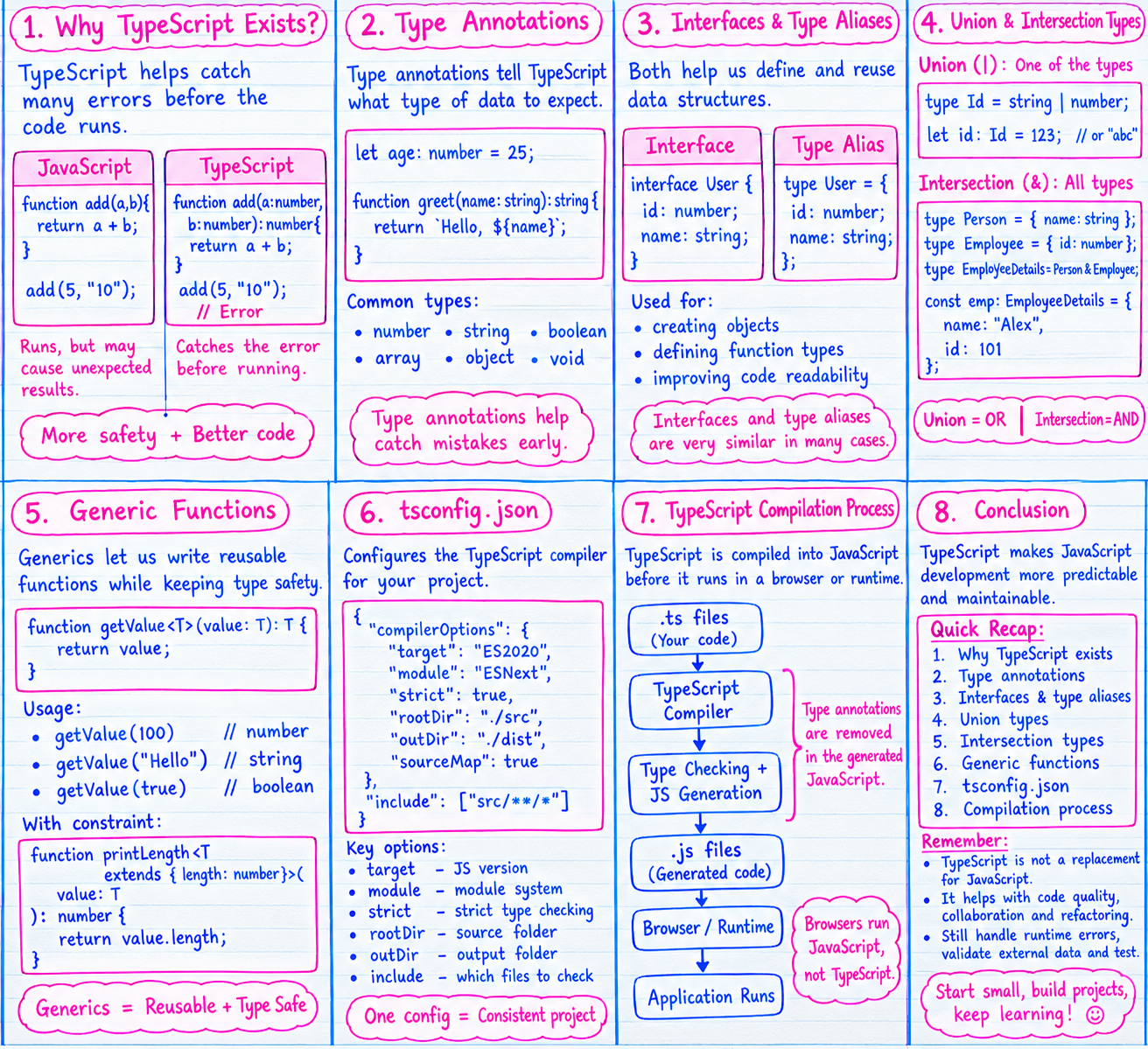
Conclusion: Why Should Developers Learn TypeScript?
TypeScript makes JavaScript development more predictable, especially when working on large applications.
Throughout this blog, we learned how TypeScript helps developers define data structures, identify type-related mistakes, and write reusable code.
Let's quickly recap what we learned.
Why TypeScript exists: It helps catch many type-related errors before the application runs.
Type annotations: They define the expected types of variables, function parameters, and return values.
Interfaces and type aliases: They help us describe and reuse data structures.
Union types: They allow a value to have one of several permitted types.
Intersection types: They combine multiple type requirements.
Generic functions: They help us write reusable functions while preserving type information.
tsconfig.json: It defines the TypeScript compiler settings for a project.Compilation: TypeScript code is transformed into JavaScript so it can run in a compatible environment.
The important thing to remember is that TypeScript is not a replacement for JavaScript. It builds on JavaScript by adding a type system and development tools that make code easier to understand and maintain.
For developers working with React, Node.js, or large frontend applications, TypeScript can improve code quality, collaboration, and refactoring.
However, TypeScript does not eliminate every bug. Developers still need to understand business logic, handle runtime errors, validate external data, and test their applications.
The best way to learn TypeScript is by using it. Start with simple variables and functions, then move to interfaces, generics, and real-world application features.
As your projects grow, you will understand not just how TypeScript works, but also why it is useful in everyday development.
Comments
Join the discussionNo comments yet. Be the first to comment.