Background Workflows in AI: A Beginner-Friendly Guide
Chapter 1: The Problem With Doing Everything Inside a Web Request
1. What Is a Web Request?
When you click a button on a website, the frontend often sends a request to the backend.
For example, imagine an AI application that checks code for bugs.
When you click Review My Code:
The frontend sends the code to the backend.
The backend sends the code to an AI model.
The AI checks the code and finds bugs.
The backend returns the results to the frontend.
The frontend displays the results.
This is how a basic request-response flow works.
2. What Is a Synchronous Request?
A synchronous request means the caller waits for the operation to finish and return a response.
Example:
Imagine ordering food at a restaurant. You place your order and wait until the food is ready.
Similarly, a website sends a request and waits for the backend to return the result.
3. Why Can This Become a Problem?
Some tasks take only a few milliseconds. Others can take several minutes.
For example, an AI application might need to:
Review a large codebase.
Read hundreds of pages in a document.
Analyse multiple resumes.
Generate a detailed report.
Search for information using an AI agent.
If the backend must finish all this work before responding, the user may have to wait a long time.
This can cause several problems:
1. Request timeout
The request may take longer than the server or platform allows. The user may receive an error even if the AI was still working.
2. Poor user experience
The user has to wait without knowing when the task will finish.
3. Failure handling becomes difficult
If an external AI service fails, the application needs a way to recover without unnecessarily repeating all the work.
4. Server resources are occupied
The application may need to keep requests open while waiting for slow external services.
4. A Simple Example
Suppose an AI code review takes 60 seconds.
The frontend sends a request, and the backend waits for the AI to finish.
If the request times out after 30 seconds, the user may see an error before receiving the report.
The AI task and the web request have different lifetimes. The request may end before the work is complete.
5. Diagram: Synchronous Request
User clicks a button
        |
        v
Frontend sends request
        |
        v
Backend starts AI task
        |
        v
AI analyses the code
        |
        v
Backend waits for AI
        |
        v
Response returned
The user waits while the backend completes the task.
6. Can We Just Increase the Timeout?
Increasing the timeout might help in some cases, but it does not solve every problem.
What happens if the task takes five minutes? What if the AI service fails? What if the user closes the browser?
We need a better way to handle work that takes a long time.
This is where background workflows become useful.
Chapter Summary
A web request allows the frontend and backend to communicate.
In a synchronous request, the caller waits for the result.
AI tasks can take a long time to finish.
Long-running requests can lead to timeouts and poor user experiences.
Background workflows let us handle long-running work separately from the initial request.
Next chapter: Long-Running AI Tasks — Why AI operations can take more time than ordinary API requests.
Chapter 2: Long-Running AI Tasks
1. What Is a Long-Running Task?
A long-running task is an operation that takes a relatively long time to complete.
In a normal application, some tasks are quick. For example, displaying a user's name or fetching a small list of products.
But some tasks need more time, especially when they involve AI models, large amounts of data, or external services.
Examples of long-running AI tasks:
Reviewing a large codebase for bugs.
Reading and summarizing a long PDF.
Analysing hundreds of resumes.
Generating a detailed report.
Researching a topic using multiple AI tools.
These tasks may take seconds or minutes, depending on the amount of work involved.
2. Why Do AI Tasks Take So Long?
There are several reasons.
A. Large amounts of data
Suppose you ask an AI to summarize a 200-page document.
The application may need to extract the text, divide it into smaller sections, analyse those sections, and combine the results.
More data can mean more processing time.
B. Waiting for an AI model
Your application sends a request to an AI service and waits for its response.
The AI service may take time to process the input and generate the answer.
C. Multiple steps
Some AI tasks require several operations.
For example, an AI code review might need to:
Read the code files.
Identify potential bugs.
Check for security issues.
Suggest improvements.
Generate a final report.
The application may need to complete these steps in sequence.
D. Calling external services
An AI application may use other services to retrieve information, read files, or send notifications.
If one of those services is slow, the overall task can take longer.
3. A Real-World Example: AI Document Processing
Imagine you build an application that summarizes PDF documents.
A user uploads a large PDF and clicks Generate Summary.
The application needs to:
Receive the PDF.
Extract its text.
Process the content.
Send relevant text to an AI model.
Generate a summary.
Save the summary.
Make the result available to the user.
Each step takes some time.
If the application tries to complete every step inside one web request, the request may take too long.
The problem is not necessarily that the AI is slow. The problem is that the entire operation involves several tasks that must be completed.
4. How Can We Handle Long-Running AI Tasks?
One approach is to separate the initial request from the actual work.
Instead of making the user wait for the complete summary, the application can:
Accept the uploaded document.
Start a background job.
Immediately tell the user that processing has started.
Process the document in the background.
Save the summary when it is ready.
Notify the user or let them check the result.
The user does not need to keep the original request open until the work finishes.
This is the basic idea behind background processing.
5. Diagram: Processing an AI Task in the Background
       User uploads PDF
              |
              v
       Backend accepts it
              |
              v
       Job is scheduled
              |
              v
       Response to user
       "Processing started"

       Meanwhile...
              |
              v
       Background worker
              |
              v
       AI processes document
              |
              v
       Summary is saved
              |
              v
       User gets the result
The initial request and the longer-running task are handled separately.
6. Where Does Inngest Fit In?
When an application has only one simple background task, developers might implement it with a basic job queue or worker.
But as the application grows, managing background tasks becomes more complicated.
Developers may need to handle:
Starting jobs when events occur.
Retrying failed operations.
Running multiple steps in the correct order.
Tracking workflow progress.
Avoiding unnecessary repetition of completed work.
Inngest is a platform that helps developers build and run event-driven background workflows. It provides features for executing functions, coordinating steps, and handling retries.
We will explore Inngest in a later chapter.
For now, remember that Inngest helps manage the work that should happen after an application receives an event, rather than forcing everything to finish inside the original web request.
7. Chapter Summary
A long-running task takes more time than a simple operation.
AI tasks may involve large inputs, multiple steps, and external services.
Keeping a web request open for the entire operation can cause problems.
Background processing allows the task to continue separately from the initial request.
Inngest helps developers manage these background workflows reliably.
Next chapter: What Are Background Workflows? We will learn how they work and how they differ from ordinary API requests.
Chapter 3: What Are Background Workflows?
1. What Is a Background Workflow?
A background workflow is a series of tasks that an application performs separately from the user's initial request.
The user does not need to wait for every task to finish before receiving a response.
Simple example:
Imagine you upload a PDF to an AI application to get a summary.
Instead of making you wait until the summary is ready, the application can:
Accept the PDF.
Tell you that processing has started.
Extract the text from the PDF.
Send the text to an AI model.
Generate and save the summary.
Notify you when the summary is ready.
These steps together form a workflow.
Because the lengthy work happens in the background, the user can continue using the application while processing takes place.
2. Understand It With a Simple Example
Imagine you order a product online.
After placing your order, you immediately receive an order confirmation.
You don't have to wait until the product is packed, shipped, and delivered to receive that confirmation.
The company handles the remaining steps separately:
Confirm the order.
Prepare the package.
Ship the product.
Update the delivery status.
Notify you when it arrives.
A background workflow follows a similar idea: accept the request, then perform the remaining work as needed.
3. How Does a Background Workflow Work?
Let's use our AI document summarization application.
**Step 1: User uploads a PDF**
<text color="secondary" size="sm">The frontend sends the request.</text>
**Step 2: Backend accepts the request**
<text color="secondary" size="sm">The application saves the document and schedules the work.</text>
**Step 3: User receives a response**
<text color="secondary" size="sm">"Your document is being processed."</text>
BACKGROUND WORK STARTS OR CONTINUES **Step 4: Process the document**
<text color="secondary" size="sm">Extract text and send it to the AI model.</text>
**Step 5: Save the result**
<text color="secondary" size="sm">Store the completed summary.</text>
**Step 6: Show the summary**
<text color="secondary" size="sm">The user can view the completed result.</text>
The important point is that the initial web request does not have to remain open until all the work is finished.
The application still needs a way to start the background work and let the user retrieve the result.
4. What Is the Difference Between a Request and a Workflow?
| Web request | Background workflow |
|---|---|
| Starts when a client sends a request. | Starts when a configured trigger or event occurs. |
| Usually returns a response to the client. | Can continue after the initial response. |
| Often used for quick operations. | Useful for long-running or multi-step tasks. |
| May be affected by request timeouts. | Can manage longer work independently of the original request. |
A background workflow does not replace web requests. Both are useful and often work together.
For example, a web request can start a workflow, and another web request can fetch the result later.
5. Does Background Processing Mean the Work Happens Immediately?
Not necessarily.
A background task may start immediately, or it may wait in a queue until a worker is ready.
A worker is a process that executes background tasks.
For example, if 1,000 users upload documents at the same time, the application can manage the work and process tasks as resources become available.
The exact behaviour depends on how the system is designed.
6. Why Are Background Workflows Useful?
They help developers:
Improve user experience: Users don't need to wait for lengthy tasks to finish.
Handle multiple steps: Tasks can run in a defined order.
Recover from failures: Failed steps can be retried when appropriate.
Track progress: The application can record whether work is pending, running, completed, or failed.
Manage workloads: Background work can be handled by separate workers.
These benefits depend on the implementation and the tools being used.
7. Chapter Summary
Remember these three points:
A background workflow performs work separately from the initial request.
A workflow can contain multiple tasks that run in a specific order.
The user can receive an immediate acknowledgement while the longer task continues in the background.
Next chapter: Why AI Applications Need Asynchronous Processing — we will understand what asynchronous means, how it differs from synchronous processing, and why it is useful for AI applications.
Chapter 4: Why AI Applications Need Asynchronous Processing
1. What Does Asynchronous Mean?
Let's understand this with a simple example.
Imagine you put rice on the stove to cook.
While the rice is cooking, you can cut vegetables, prepare dal, or clean the kitchen. You don't need to stand beside the stove doing nothing.
This is similar to asynchronous processing.
Asynchronous processing allows an application to start an operation and continue doing other work without waiting for that operation to finish immediately.
For example, an application can accept a document and start processing it in the background while the user continues using the website.
2. Synchronous vs Asynchronous Processing
Let's compare both approaches.
Synchronous processing
Imagine asking an AI to summarize a large PDF.
The application sends the request and waits until the AI finishes generating the summary.
User sends request
        |
        v
Application waits
        |
        v
AI generates summary
        |
        v
Application returns result
The user waits for the operation to finish.
Asynchronous processing
Now imagine the application schedules the summary task in the background.
User sends request
        |
        v
Application schedules task
        |
        v
Returns "Processing started"
        |
        v
Background task continues
        |
        v
AI generates summary
        |
        v
Result is saved
The user receives an acknowledgement before the summary is ready.
They can return later to view the result or receive a notification.
Important: Asynchronous processing does not necessarily make the AI model itself faster. It changes how the application handles the work and waits for the result.
3. Why Do AI Applications Need Asynchronous Processing?
AI applications often perform tasks that take time.
Here are four common examples.
A. AI code review
A developer submits a large code change.
The application needs to inspect the files, analyse potential bugs, and generate recommendations.
Instead of making the developer wait for the entire review, the application can run it in the background and notify the developer when it finishes.
B. Document processing
A user uploads a large PDF.
The application extracts the text, analyses the content, and generates a summary.
This can happen in the background while the user continues with other activities.
C. Sending emails
Suppose an AI application generates a report and needs to email it to the user.
The application can save the report and schedule the email to be sent separately rather than making the original request wait for the email service.
D. AI agents
An AI agent may need to search for information, call tools, analyse results, and prepare a final answer.
If this involves many steps, background processing can help the application manage the work without keeping the original request open.
4. Does Asynchronous Mean Background Processing?
Not always.
These concepts are related, but they are not exactly the same.
Asynchronous processing means an operation can proceed without the caller having to wait for its completion.
Background processing means work is performed separately from the immediate user-facing operation.
For example, a frontend can make an asynchronous API call and continue responding to user interactions while waiting for the response. However, the backend may still be performing all the work inside that single request.
A background workflow goes further by allowing the long-running task to continue independently of the initial request.
5. How Does This Help the User?
Imagine using an AI application to review code.
Without background processing:
You click the review button.
The page waits for the complete review.
You may encounter a timeout if the operation takes too long.
With background processing:
You click the review button.
The application confirms that the review has started.
You can continue using the application.
The review runs in the background.
You view the report when it is ready.
This makes the application more convenient to use.
6. Where Does Inngest Come In?
Asynchronous processing is useful, but managing background tasks can become complicated.
What happens if a task fails? How do we retry it? How do we ensure that the next step runs only after the previous step succeeds?
This is where workflow tools such as Inngest can help.
Inngest allows developers to define event-driven functions and workflows that can run in the background, with features such as step management and retries.
We'll explore how it works in the next chapter.
7. Chapter Summary
Synchronous processing makes the caller wait for the operation's response.
Asynchronous processing allows the caller to continue without waiting for the operation to finish.
Background processing is useful for long-running AI tasks.
Asynchronous processing and background processing are related, but they are not identical.
Inngest helps developers manage background workflows and their execution.
Next chapter: What Is Inngest? We'll learn what it does, why developers use it, and how it fits into an AI application.
Chapter 5: What Is Inngest?
1. What Is Inngest?
Inngest is a tool that helps developers run background tasks and manage workflows.
It is useful when an application needs to perform multiple tasks, handle failures, or continue working even when an operation takes a long time.
For example, imagine an AI application that reviews code.
The application needs to:
Read the submitted code.
Ask an AI model to review it.
Save the review report.
Send the report to the developer.
Instead of managing every step manually, developers can use Inngest to coordinate this work.
Inngest helps run the workflow, remember completed steps, and retry failed steps when appropriate. <Cite refs={["turn227664search1","turn227664search4"]}/>
2. Why Do Developers Use Inngest?
Without a workflow tool, developers may need to build and manage much of the background-processing logic themselves.
For example, they may need to handle:
Starting background tasks.
Keeping track of task progress.
Retrying failed operations.
Managing multiple steps.
Understanding where a workflow failed.
Inngest provides features to help manage these responsibilities.
The main benefit: Developers can focus more on what their application needs to do and less on building all the workflow-management infrastructure themselves.
3. How Does Inngest Work?
Let's use an AI document summarization application.
A user uploads a document and requests a summary.
The application sends an event to Inngest to start the workflow.
Inngest then coordinates the steps that process the document.
**User uploads a document** **Application sends an event** Example: document/uploaded **Inngest starts the workflow** **Step 1: Extract document text** **Step 2: Generate AI summary** **Step 3: Save the summary** **The result is ready**
In this example, Inngest coordinates the workflow, while your application contains the actual business logic, such as extracting text and calling the AI model. <Cite refs={["turn227664search1","turn227664search7"]}/>
4. What Are Steps in Inngest?
A step is one individual piece of work inside a workflow.
For example, an AI document workflow might contain these steps:
| Step | Work performed |
|---|---|
| Step 1 | Extract text from the PDF |
| Step 2 | Send the text to the AI model |
| Step 3 | Save the generated summary |
| Step 4 | Notify the user |
Each step has a specific responsibility.
Inngest can save the result of a completed step. If a later step fails and is retried, completed steps can be reused instead of repeating their work. <Cite refs={["turn227664search4","turn227664search2"]}/>
5. What Happens If a Step Fails?
Suppose the workflow has three steps:
Step 1: Extract document text — successful.
Step 2: Generate an AI summary — successful.
Step 3: Save the summary — failed because the database is temporarily unavailable.
The application can retry the failed step.
Step 1: Extract text
        |
        v
      Success
        |
        v
Step 2: Generate summary
        |
        v
      Success
        |
        v
Step 3: Save summary
        |
        v
       Failed
        |
        v
        Retry
        |
        v
      Success
The completed steps do not normally need to repeat when Inngest resumes from saved step results.
This saves unnecessary work and can make the workflow more reliable. However, external actions such as sending an email or charging a payment still need careful handling to avoid duplicate effects. <Cite refs={["turn227664search2","turn227664search4"]}/>
6. Does Inngest Replace the Backend?
No.
Your backend is still responsible for your application's logic.
For example, your backend may contain code that:
Reads and saves database records.
Calls an AI model.
Validates user input.
Generates a report.
Inngest helps coordinate when that work runs and how the workflow handles steps, waits, and retries.
Also, Inngest does not make every AI operation faster. Its main purpose is to help manage the execution of background work reliably.
7. Chapter Summary
Remember these five points:
Inngest helps developers build and manage background workflows.
An event, schedule, webhook, or other supported trigger can start a workflow.
A workflow contains individual steps.
Inngest can save completed step results and retry failed steps.
Your application still performs the actual business logic.
Next chapter: Events and Workflow Execution — we will understand what an event is, how an event starts a workflow, and how an application communicates with Inngest.
Chapter 6: Events and Workflow Execution
1. What Is an Event?
An event is a message that tells an application that something has happened.
For example:
A user has uploaded a document.
A customer has placed an order.
A developer has created a pull request.
A user has registered for an account.
These actions can generate events.
Think of an event as a notification to the application.
Example:
When a user uploads a document, the application can create an event called:
document/uploaded
This event tells the system that a new document has been uploaded and may need to be processed.
2. What Information Does an Event Contain?
An event usually contains two important things:
Event name: What happened?
Event data: What information is needed to process it?
For example:
{
  "name": "document/uploaded",
  "data": {
    "documentId": "DOC101",
    "userId": "USER25"
  }
}
Let's understand it.
document/uploadedtells us that a document was uploaded.documentIdidentifies the document.userIdidentifies the user who uploaded it.
The workflow can use this information to find the document and start processing it.
3. How Does an Event Start a Workflow?
Let's return to our AI document summarization application.
A user uploads a PDF and wants an AI-generated summary.
Here is what happens:
The user uploads the PDF.
The backend saves the document.
The backend sends an event to Inngest.
Inngest checks which workflow listens for that event.
The matching workflow starts running.
The workflow processes the document and saves the summary.
The backend does not need to directly manage every step of the workflow inside the original web request.
4. Diagram: Event to AI Result
User uploads PDF
       |
       v
Backend saves document
       |
       v
Event sent to Inngest
       |
       v
Inngest finds matching workflow
       |
       v
Workflow starts
       |
       v
AI processes document
       |
       v
Summary is saved
       |
       v
Result is ready
The important idea is that the event starts the workflow, and the workflow performs the actual work.
5. What Is a Trigger?
An event describes what happened.
A trigger defines what should start a particular workflow.
For example, suppose you have an event called:
document/uploaded
You can configure a workflow to start whenever this event arrives.
That configuration is the trigger.
Think of a light switch.
Pressing the switch is the event.
The mechanism that turns on the light is the response to that event.
In the same way, when Inngest receives an event matching a workflow's trigger, it can start that workflow. <Cite refs={["turn159509search0","turn159509search1"]}/>
6. Can One Event Start Multiple Workflows?
Yes!
This is one of the useful features of event-driven systems.
Imagine a customer places an order.
The application generates this event:
shop/order.placed
Different workflows can respond to the same event.
For example:
Workflow 1: Payment processing
Process the payment.
Record the payment result.
Workflow 2: Email notification
Prepare the order confirmation.
Send the customer an email.
Workflow 3: Inventory management
Update the available stock.
Record the items sold.
The application sends one event, and each matching workflow can run independently. <Cite refs={["turn159509search1","turn159509search3"]}/>
7. What Happens If No Workflow Matches the Event?
Suppose the application sends this event:
document/uploaded
But none of the configured workflows listens for it.
In that case, no matching workflow starts.
When debugging, developers should check:
Is the event name correct?
Has the workflow been registered with Inngest?
Does its trigger match the event?
Is the application using the correct environment?
These are common places to investigate when an expected workflow does not run.
8. What Other Things Can Start a Workflow?
An event is not the only way to start background work.
A workflow can also be started by:
A schedule: For example, generate a report every morning.
A webhook: For example, start a code review when GitHub sends a pull request notification.
A direct invocation: Another workflow or supported application mechanism explicitly calls a function.
We'll discuss webhooks in a later chapter.
9. Chapter Summary
Remember these five points:
An event tells the system that something has happened.
Event data contains information needed to process that event.
A trigger determines when a workflow should start.
Inngest matches incoming events to configured workflows.
One event can start multiple matching workflows.
Next chapter: Retries and Reliable Execution — we will learn what happens when a workflow fails and how Inngest can retry failed steps.
Chapter 7: Retries and Reliable Execution
1. What Happens When a Background Task Fails?
Imagine an AI application that reads a PDF and creates a summary.
The workflow has three steps:
Extract text from the PDF.
Send the text to an AI model.
Save the summary in the database.
The first step succeeds. The second step also succeeds.
But the database is temporarily unavailable when the application tries to save the summary.
What happens now?
If the application cannot handle this failure, the workflow may stop without saving the result.
The user might have to start the entire process again.
This is why retries and reliable execution are important.
2. What Is a Retry?
A retry means trying an operation again after it fails.
For example, imagine you are calling an AI service, but it temporarily returns an error.
Your application can wait a little and try the request again.
Call AI service
      |
      v
    Failed
      |
      v
    Wait
      |
      v
   Try again
      |
      v
   Successful
A temporary failure does not always mean the operation will fail again.
The AI service might have been busy, or a network connection might have briefly stopped working.
Retries give the application another chance to complete the task.
3. Why Are Retries Important for AI Applications?
AI applications often depend on external services, databases, and APIs.
Any of these can experience temporary problems.
For example:
An AI provider is temporarily unavailable.
A network request fails.
A database connection is interrupted.
A third-party API returns an error.
A service temporarily limits the number of requests.
Without retry logic, a small temporary problem could interrupt the entire workflow.
With retries, the application can attempt the failed operation again.
However, retries cannot fix every failure. Invalid input or incorrect application logic may require a code change instead.
4. How Does Inngest Handle Retries?
Inngest supports retrying failed workflow steps.
Developers can configure how many times a function should be retried. Inngest also supports retry behaviour for individual steps and functions, depending on how the workflow is configured. <Cite refs={["turn463121search0","turn463121search2"]}/>
Let's look at an example.
Suppose an AI workflow has three steps:
| Step | Result |
|---|---|
| Extract PDF text | Successful |
| Generate AI summary | Successful |
| Save summary | Failed |
If the save operation fails temporarily, the workflow can retry the failed step.
Step 1: Extract text
         |
         v
      Success
         |
         v
Step 2: Generate summary
         |
         v
      Success
         |
         v
Step 3: Save summary
         |
         v
       Failed
         |
         v
       Retry
         |
         v
      Success
When completed step results have been saved, the workflow can reuse them rather than repeat all the previous work.
This can save time and avoid unnecessary AI calls.
5. What Is a Retry Delay?
Applications do not always retry immediately after a failure.
They can wait before trying again.
For example:
First attempt: Fails.
Wait 2 seconds.
Second attempt: Fails.
Wait longer.
Third attempt: Succeeds.
The actual delay depends on the retry configuration.
Waiting can be useful because the external service may need time to recover.
Some systems use exponential backoff, which means the waiting time increases after repeated failures.
For example:
First retry  → Wait 1 second
Second retry → Wait 2 seconds
Third retry  → Wait 4 seconds
These are illustrative values, not universal defaults.
6. What Happens If Every Retry Fails?
Retries do not guarantee success.
Suppose an AI service is unavailable for a long time.
The workflow may fail even after several retry attempts.
A reliable application should have a plan for this situation.
It might:
Record the failure.
Mark the workflow as failed.
Show an appropriate status to the user.
Notify the development team if necessary.
Allow the task to be investigated or restarted.
The exact behaviour depends on the application's design and its error-handling rules.
7. An Important Warning: Retries Can Cause Duplicate Actions
Imagine an application sends an email.
The email service sends the email successfully, but the application loses the response.
The application cannot tell whether the email was sent.
If it retries the operation, the user might receive the same email twice.
This is why developers must be careful when retrying operations that create external effects, such as:
Sending emails.
Charging payments.
Creating orders.
Publishing messages.
One common solution is idempotency.
Idempotency means that repeating an operation with the same identifier or request does not create the same effect multiple times.
For example, an application can use a unique payment request ID to prevent the same payment from being charged twice.
Retries help reliability, but they must be combined with appropriate safeguards.
8. Chapter Summary
Remember these five points:
A retry means trying a failed operation again.
Retries help recover from temporary failures.
Inngest can retry failed workflow steps according to the configured behaviour.
If all attempts fail, the application needs a way to report and handle the failure.
Retried operations must be designed carefully to avoid duplicate actions.
Next chapter: Webhooks Triggering AI Workflows — we will learn how an external service, such as GitHub, can automatically start an AI workflow when something happens.
Chapter 8: Webhooks Triggering AI Workflows
1. What Is a Webhook?
A webhook is a way for one application to automatically send information to another application when a particular event happens.
Let's understand with a simple example.
Imagine you are building an AI application that reviews code.
When a developer creates a pull request on GitHub, you want your AI application to review the code automatically.
You don't want to check GitHub every few seconds to see whether a new pull request has been created.
Instead, GitHub can send a notification to your application when the pull request event occurs.
This notification is called a webhook.
In simple words:
A webhook tells your application that something has happened in another application.
2. How Does a Webhook Work?
Let's say a developer creates a pull request on GitHub.
Here is what happens:
A developer creates a pull request.
GitHub detects the event.
GitHub sends an HTTP request to a configured webhook URL.
Your application receives the notification.
Your application starts an AI code review workflow.
The AI analyses the code and generates a report.
The entire process can happen automatically, without someone manually clicking a review button in your application.
3. Diagram: GitHub to AI Code Review
Developer creates PR
         |
         v
       GitHub
         |
         v
   Sends webhook
         |
         v
   Your application
         |
         v
   Sends event to Inngest
         |
         v
   AI review workflow
         |
         v
   AI analyses code
         |
         v
   Review report saved
The webhook connects GitHub to your application. Inngest then helps manage the background workflow.
4. What Is a Webhook URL?
A webhook URL is an HTTP endpoint where an application can send a notification.
For example:
https://example.com/webhooks/github
When a pull request event occurs, GitHub can send an HTTP request to this URL.
Your application receives the request and processes the event.
The URL above is only an example. In a real application, you would configure your own endpoint.
5. How Does Inngest Fit Into This Process?
A webhook and Inngest have different responsibilities.
GitHub: Detects that a pull request event has occurred.
Webhook endpoint: Receives the notification from GitHub.
Your backend: Validates the webhook and decides what should happen.
Inngest: Coordinates the background workflow.
AI model: Analyses the code and generates findings.
For example, after receiving a valid webhook, your backend can send an event to Inngest.
The event might contain information such as the repository name and pull request number.
Inngest can use that event to start the matching workflow.
The workflow can then fetch the required code, run the AI review, save the results, and notify the developer.
6. What Is the Difference Between an Event and a Webhook?
These terms are related, but they are not the same.
| Event | Webhook |
|---|---|
| Describes something that happened. | Delivers information about an event to another application. |
| Can exist inside your application. | Commonly uses an HTTP request between applications. |
Example: code/review.requested |
Example: GitHub sends a pull request notification to your endpoint. |
Think of it this way:
An event is the information about what happened. A webhook is one way to deliver that information to another application.
7. What Should We Consider When Using Webhooks?
Webhooks are useful, but developers need to handle them carefully.
1. Verify the sender
Do not automatically trust every incoming request. Verify webhook signatures or use the authentication mechanism supported by the provider.
2. Handle duplicate notifications
The same webhook may be delivered more than once. Your application should avoid accidentally starting duplicate work.
3. Respond promptly
Your webhook endpoint should validate the request, accept the event, and return an appropriate response quickly. Long-running AI processing should generally happen separately.
4. Handle failures
If your endpoint is unavailable, the webhook provider may retry delivery according to its policies. Your application should be designed to handle these retries safely.
8. Where Else Can Webhooks Be Used?
Webhooks can trigger many types of AI workflows.
Document processing: Start analysis when a document is uploaded to a supported service.
Customer support: Analyse a new support ticket.
E-commerce: Generate an order summary when an order is placed.
Recruitment: Analyse a resume when it arrives through an integrated system.
Code review: Start an AI review when GitHub reports a new pull request.
The external application reports the event, and your application decides what action to take.
9. Chapter Summary
Remember these five points:
A webhook sends information from one application to another when an event occurs.
The receiving application exposes a webhook endpoint.
The endpoint should validate the incoming request and handle it promptly.
Your backend can send an event to Inngest to start a background workflow.
Security, duplicate notifications, and failure handling are important when implementing webhooks.
Next chapter: Agents Inside Background Workflows — we will learn how AI agents can perform multiple tasks as part of a managed workflow.
Chapter 9: Agents Inside Background Workflows
1. What Is an AI Agent?
An AI agent is a system that uses an AI model to work toward a goal. Depending on how it is designed, it can decide which steps to take and use tools to complete tasks.
Let's understand with an example.
Imagine you want to build an AI agent that reviews code.
You give it this task:
"Review this code, find bugs, and suggest improvements."
The agent might:
Read the code.
Identify possible bugs.
Use a tool to inspect relevant files.
Analyse the results.
Prepare a final report.
The agent uses the available information and tools to work toward the goal.
Not every AI agent works in exactly the same way. Some follow predefined steps, while others decide which steps to take based on the task.
2. Why Do AI Agents Need Background Workflows?
Some AI agents finish their work quickly.
Others need to perform many operations, call external services, or process large amounts of information.
For example, a research agent might need to:
Search multiple websites.
Read several documents.
Compare information.
Summarize its findings.
Generate a final report.
This can take time.
If all the work happens inside a single web request, the application may experience timeouts or other problems.
A background workflow allows the agent's work to continue separately from the initial request.
3. AI Agent vs Background Workflow
These two concepts are different, but they work well together.
| AI agent | Background workflow |
|---|---|
| Works toward a goal using AI and possibly tools. | Coordinates when and how tasks are executed. |
| May decide which action to take next. | Can define the order of steps and handle retries. |
| Example: An agent reviews code. | Example: A workflow starts the review and saves the results. |
Remember: The agent does the intelligent task. The workflow manages the process around that task.
4. How Do They Work Together?
Imagine an application that automatically reviews GitHub pull requests.
A developer creates a pull request, and GitHub sends a webhook to your application.
Your application sends an event to Inngest.
The workflow starts and runs the code-review agent.
The agent analyses the code and generates findings. The workflow then saves the results and sends a notification.
Here is the flow:
Developer creates PR
         |
         v
   GitHub webhook
         |
         v
    Inngest event
         |
         v
  Background workflow
         |
         v
   AI code-review agent
         |
         v
  Analyse code and find bugs
         |
         v
   Generate review report
         |
         v
   Save and notify user
The workflow and the agent have different responsibilities.
The workflow coordinates the overall process. The agent performs the AI-powered review.
5. Can a Workflow Have Multiple AI Agents?
Yes.
An application can use multiple agents when different tasks require different responsibilities.
For example, an AI code-review application might have:
Agent 1: Bug detection
Looks for possible logical errors and incorrect behaviour.
Agent 2: Security review
Looks for potential security weaknesses.
Agent 3: Code improvement
Suggests ways to improve readability and maintainability.
The workflow can coordinate these agents and combine their results into one report.
          Pull Request
                |
                v
        Background workflow
                |
        +-------+-------+
        |       |       |
        v       v       v
      Bug    Security  Code
    detection review  quality
        |       |       |
        +-------+-------+
                |
                v
      Combine review results
                |
                v
        Final review report
These agents could run sequentially or in parallel, depending on their dependencies and the workflow design.
Using multiple agents is not always necessary. A single agent or even a simple AI call may be enough for many applications.
6. What Does Inngest Do in This Setup?
Inngest helps coordinate the workflow around the agent.
For example, it can help the application:
Start the workflow when an event arrives.
Execute steps in the required order.
Retry failed steps according to the configured policy.
Preserve completed step results.
Coordinate tasks that depend on one another.
Your application still needs to implement the agent, connect it to the AI model, and provide any required tools.
Inngest manages the workflow; it does not automatically create a capable AI agent for you.
7. What Happens If an Agent Fails?
Suppose the bug-detection agent finishes successfully, but the security-review agent fails because the AI service is temporarily unavailable.
A well-designed workflow can retry the failed operation.
If completed results have been saved as workflow steps, the application may reuse those results instead of repeating the bug-detection work.
However, agents can produce different results when run again. External actions and duplicate tool calls must also be handled carefully.
This is one reason workflow design matters when building production AI applications.
8. Chapter Summary
Remember these five points:
An AI agent works toward a goal using an AI model and possibly tools.
A background workflow manages the execution of longer-running tasks.
AI agents can run as steps inside a background workflow.
Multiple agents can handle different responsibilities when needed.
Inngest helps coordinate workflow execution, but the application still implements the agent's logic.
Next chapter: Real-World Examples of AI Workflows — we will explore how these ideas fit into production applications, from document processing to code review and customer support.
Chapter 10: Real-World Examples of AI Workflows
1. Where Are Background Workflows Used?
Background workflows are useful when an application needs to perform tasks that take time, involve multiple steps, or depend on external services.
AI applications often need to read documents, analyse information, call AI models, save results, and notify users.
Instead of doing everything inside one web request, developers can organise this work into a background workflow.
Let's look at some real-world examples.
2. Example 1: AI Code Review
Imagine a developer creates a pull request on GitHub.
The team wants AI to review the code automatically and identify possible bugs.
How it works:
A developer creates a pull request.
GitHub sends a webhook to the application.
The application sends an event to Inngest.
Inngest starts the background workflow.
The AI analyses the code.
The application saves the review report.
The developer receives the results.
Diagram:
GitHub Pull Request
         |
         v
      Webhook
         |
         v
   Inngest Event
         |
         v
  Background Workflow
         |
         v
    AI Code Review
         |
         v
   Save Review Report
         |
         v
 Notify Developer
Why use a background workflow?
Code reviews may involve multiple files, AI calls, and additional checks. Running this work in the background avoids keeping the original request open until the entire review finishes.
3. Example 2: AI Document Processing
Imagine a company receives hundreds of invoices and contracts every day.
Employees need to extract important information from these documents.
An AI application can automate much of this work.
How it works:
A user uploads a document.
The application creates a processing job.
The workflow extracts the document's text.
An AI model identifies important information.
The application validates and saves the results.
The user can view the processed information.
For an invoice, the extracted information might include the invoice number, supplier name, date, and total amount.
Diagram:
Document Uploaded
        |
        v
  Start Workflow
        |
        v
  Extract Text
        |
        v
  AI Reads Content
        |
        v
 Extract Key Details
        |
        v
  Save Results
        |
        v
 Display to User
Why use a background workflow?
Large documents may take time to process. The workflow can also retry temporary failures and track the status of each document.
For important financial or legal documents, extracted information should be validated rather than blindly trusted.
4. Example 3: AI Customer Support
Imagine an online shopping company receives thousands of customer support messages.
The company wants to classify each message and help its support team respond faster.
How it works:
A customer submits a support ticket.
The application generates an event.
An AI model classifies the ticket.
The workflow identifies its category and priority.
The application saves the classification.
The ticket is routed to the appropriate support team.
For example, a message about a failed payment might be classified as a payment issue and routed to the payments team.
Diagram:
Customer Sends Message
          |
          v
      New Ticket
          |
          v
   Background Workflow
          |
          v
    AI Classifies Ticket
          |
          v
  Save Category & Priority
          |
          v
   Route to Support Team
Why use a background workflow?
The application can process incoming tickets without making the customer wait for every internal operation to finish.
A human support agent can still review the AI's classification and handle sensitive cases.
5. Example 4: AI Research Assistant
Imagine a user asks an AI research assistant:
"Compare three cloud platforms and prepare a report."
This task may require several operations.
How it works:
The user submits the research question.
The application starts a workflow.
The system gathers information from permitted sources.
An AI agent analyses the information.
The application combines the findings.
A report is generated and saved.
The user is notified when the report is ready.
Diagram:
Research Question
        |
        v
  Start Workflow
        |
        v
 Gather Information
        |
        v
  AI Analyses Data
        |
        v
 Compare Findings
        |
        v
 Generate Report
        |
        v
 Notify User
Why use a background workflow?
Research can involve multiple searches, external services, and AI operations. The workflow can coordinate the steps and recover from temporary failures.
6. Example 5: AI Email Processing
Imagine a company receives hundreds of emails from customers and suppliers.
An AI application needs to categorise the emails, extract important details, and send them to the correct team.
How it works:
A new email arrives.
An email service sends a webhook or event.
The workflow starts processing the email.
AI identifies the topic and extracts relevant information.
The application saves the result.
The email is routed to the appropriate team.
Diagram:
New Email Arrives
        |
        v
   Event Received
        |
        v
  Inngest Workflow
        |
        v
  AI Analyses Email
        |
        v
 Extract Information
        |
        v
  Route to Team
Why use a background workflow?
The company can process incoming emails automatically and handle failures without requiring someone to start each task manually.
7. What Do These Examples Have in Common?
Although these applications solve different problems, their overall design is similar.
| Component | Responsibility |
|---|---|
| Frontend or external service | Starts the process or reports an event |
| Backend | Validates requests and manages application data |
| Event | Describes what happened |
| Inngest | Coordinates background workflow execution |
| AI model or agent | Analyses information or performs an AI task |
| Database | Stores results and status |
| Notification service | Informs the user when appropriate |
Not every application needs every component. The architecture depends on the requirements.
8. Putting Everything Together: AI Application Architecture
Here is a simplified architecture showing how the main components can work together.
 User / External Service
           |
           v
 Frontend / Webhook
           |
           v
        Backend
           |
           v
    Send Event to Inngest
           |
           v
   Background Workflow
           |
     +-----+------+
     |            |
     v            v
  AI Model     External APIs
     |            |
     +-----+------+
           |
           v
    Save Results
           |
           v
        Database
           |
           v
  Show Result / Notify User
The backend handles incoming requests and application logic. Inngest coordinates the background work. The AI model performs the analysis, and the database stores the results.
If a step fails, the workflow can apply its configured retry behaviour.
9. When Should You Use a Background Workflow?
A background workflow may be useful when:
A task takes too long to complete in a normal request.
The task has several steps that must run in order.
You need retries and failure handling.
External services may be temporarily unavailable.
You need to process many jobs.
The user does not need the final result immediately.
For a simple operation, such as fetching a user's name, a normal API request is usually sufficient.
Choose the simplest approach that meets the application's needs. Not every AI feature requires a complicated workflow.
10. Final Chapter Summary
Let's recap what we learned throughout this blog.
Web requests: Long-running operations can cause timeouts if the caller must wait for the entire task.
Long-running AI tasks: Code reviews, document processing, and research can involve multiple operations.
Background workflows: These allow longer tasks to continue separately from the initial request.
Asynchronous processing: The caller can continue without waiting for the operation to finish.
Inngest: Helps coordinate background workflow execution.
Events: Tell the application that something has happened and can trigger workflows.
Retries: Allow failed operations to be attempted again when appropriate.
Webhooks: Let external services notify your application about events.
AI agents: Can perform AI-powered tasks within a background workflow.
Production applications: Combine these ideas to build applications that handle long-running work more reliably.
Final takeaway
AI models provide intelligence. Background workflows help applications manage the work around that intelligence.
When an AI application needs to perform long-running, multi-step tasks, tools such as Inngest can help developers coordinate the work, handle failures, and deliver results more reliably.
Bonus Chapter: Build Your First Background Workflow With Inngest
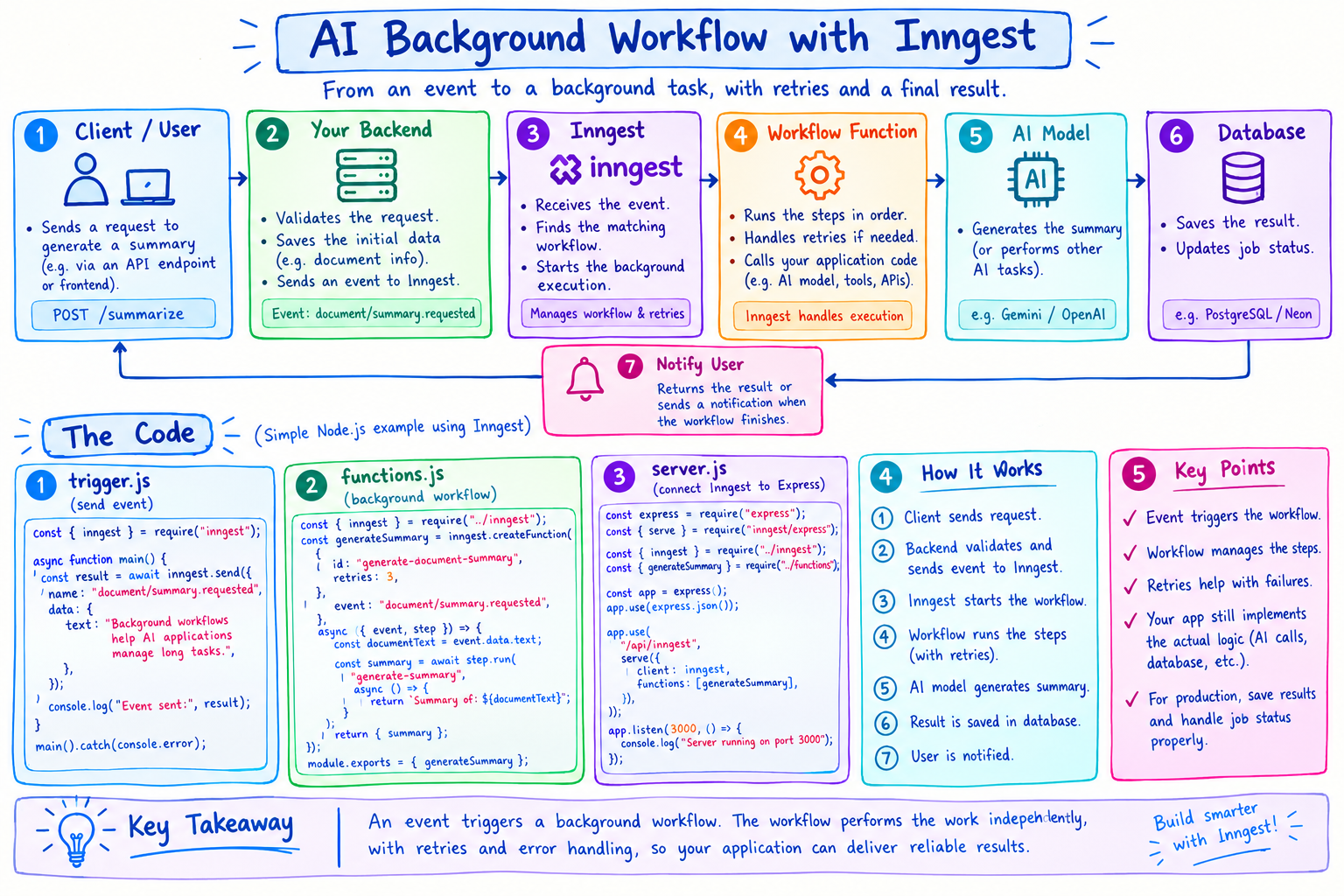
1. What Are We Going to Build?
Imagine we are building an AI application that generates a summary of a document.
When a user requests a summary, we want the application to:
Accept the request.
Start a background workflow.
Generate a summary.
Return the result when the workflow finishes.
For this example, we will use a simple message instead of calling a real AI model. This helps us understand Inngest first, without adding unnecessary complexity.
We will use JavaScript and Node.js.
2. Step 1: Create a Project
First, make sure Node.js is installed on your computer.
Create a project folder and open a terminal inside it.
Run:
mkdir ai-background-workflow
cd ai-background-workflow
npm init -y
These commands create a folder and initialise a Node.js project.
Next, install the required packages:
npm install express inngest
We use:
Express: To create a simple web server.
Inngest: To define and execute background workflows.
3. Step 2: Create the Inngest Client
Create a file named inngest.js.
Add this code:
const { Inngest } = require("inngest");

const inngest = new Inngest({
  id: "ai-background-workflow",
});

module.exports = { inngest };
Let's understand the code.
Inngestimports the Inngest client.ididentifies our application.module.exportsallows other files to use the client.
This client helps our application communicate with Inngest.
4. Step 3: Create a Background Workflow
Create a file named functions.js.
const { inngest } = require("./inngest");

const generateSummary = inngest.createFunction(
  {
    id: "generate-document-summary",
    retries: 3,
  },
  {
    event: "document/summary.requested",
  },
  async ({ event, step }) => {
    const documentText = event.data.text;

    const summary = await step.run(
      "generate-summary",
      async () => {
        // In a real application, call your AI model here.
        return `Summary of: ${documentText}`;
      }
    );

    return { summary };
  }
);

module.exports = { generateSummary };
What does this code do?
First: It defines a function named generateSummary.
Second: It listens for the event document/summary.requested.
Third: When the event arrives, it reads the document text from the event data.
Fourth: It runs a step called generate-summary.
Fifth: The step returns a sample summary.
The retries: 3 setting configures retries for the function when it fails, subject to Inngest's execution behaviour.
The example does not call a real AI model yet. It demonstrates the structure of a background workflow.
5. Step 4: Connect Inngest to Express
Create a file named server.js.
const express = require("express");
const { serve } = require("inngest/express");

const { inngest } = require("./inngest");
const { generateSummary } = require("./functions");

const app = express();

app.use(express.json());

app.use(
  "/api/inngest",
  serve({
    client: inngest,
    functions: [generateSummary],
  })
);

app.listen(3000, () => {
  console.log("Server running on port 3000");
});
This creates an Express server and exposes an endpoint that Inngest's development tools can use to discover and execute the registered workflow.
Notice this line:
functions: [generateSummary]
It registers our background workflow with the Inngest handler.
6. Step 5: Send an Event
Now create a file named trigger.js.
const { inngest } = require("./inngest");

async function main() {
  const result = await inngest.send({
    name: "document/summary.requested",
    data: {
      text: "Background workflows help AI applications manage long tasks.",
    },
  });

  console.log("Event sent:", result);
}

main().catch(console.error);
This code sends an event to Inngest.
The event name must match the trigger configured in functions.js.
When Inngest processes the event, it can start the matching workflow.
7. Step 6: Run the Application
Start your Express server:
node server.js
For local development, start the Inngest development server using the official Inngest CLI in another terminal, pointing it to your application at http://localhost:3000/api/inngest.
Then, in a third terminal, run:
node trigger.js
Check the Inngest development interface to inspect the event and workflow execution.
Important: These files demonstrate the basic structure. Exact setup commands and SDK APIs can vary by version, so follow the current Inngest JavaScript SDK documentation if your installed version reports an import or API error.
8. What Have We Built?
Our application now has the main parts of an event-driven workflow:
trigger.js
    |
    v
Sends an event
    |
    v
Inngest receives event
    |
    v
generateSummary runs
    |
    v
generate-summary step
    |
    v
Returns sample summary
The key idea is that the event triggers the workflow. The workflow performs its work independently of the code that originally sent the event.
The caller receives confirmation that the event was accepted, not necessarily the final summary.
To retrieve the final result, a production application would typically save it to a database and let the frontend check the job status or receive a notification.
9. What Should You Learn Next?
After understanding this basic workflow, the next improvements would be:
Connect a real AI model to generate summaries.
Save results and job status in a database.
Add a frontend that displays processing status.
Handle invalid input and permanent failures.
Add tests and safeguards against duplicate processing.
Final takeaway
You do not need to understand every advanced Inngest feature before getting started.
First, understand three things:
Event: What happened?
Workflow: What work should run?
Step: What individual task should be performed?
Once these are clear, it becomes much easier to understand how reliable background workflows support real-world AI applications.
Comments
Join the discussionNo comments yet. Be the first to comment.