Node.js Concurrency
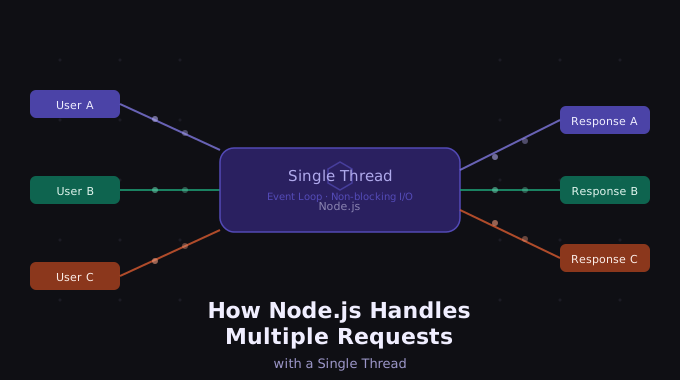
Chapter 1: Introduction to Node.js Concurrency
Real Problem Se Start Karte Hain
Imagine karo tumhari website par ek saath:
100 users login kar rahe hain
50 users products dekh rahe hain
20 users payment kar rahe hain
10 users image upload kar rahe hain
Question:
Agar Node.js single-threaded hai, toh itne saare users ko ek saath kaise handle karta hai?
Isi chapter series mein hum ye deeply samjhenge
Chapter 2: Process aur Thread Kya Hote Hain?
Process Kya Hai?
Simple language mein:
Running application = Process
Example:
Chrome open karo → ek process
VS Code open karo → ek process
Node.js app run karo → ek process
Har process ka:
apna memory space hota hai
apne resources hote hain
Thread Kya Hai?
Thread process ke andar ka worker hota hai.
Example:
Restaurant = Process
Chef = Thread
Ek restaurant mein:
multiple chefs ho sakte hain
multiple tasks ek saath ho sakte hain
Waise hi applications multiple threads use kar sakti hain.
Chapter 3: Node.js Single-Threaded Kyun Bola Jata Hai?
Node.js mainly:
ek main thread use karta hai
JavaScript code usi thread par execute hota hai
Example:
console.log("Task 1");
console.log("Task 2");
console.log("Task 3");
Output:
Task 1
Task 2
Task 3
Execution sequential hai.
Important Point
Bahut log sochte hain:
"Single-threaded matlab Node.js slow hoga"
But reality:
Node.js bahut scalable hota hai
Reason:
Async operations
Event Loop
Non-blocking architecture
Chapter 4: Chef Analogy
Imagine ek restaurant mein sirf ek chef hai.
Chef kya karta hai?
Order leta hai
Cooking start karta hai
Cooking helper ko de deta hai
Tab tak next customer ka order le leta hai
Food ready hone par serve karta hai
Chef idle wait nahi karta.
Exactly waise hi:
Node.js ka main thread kaam karta hai
Analogy Mapping:
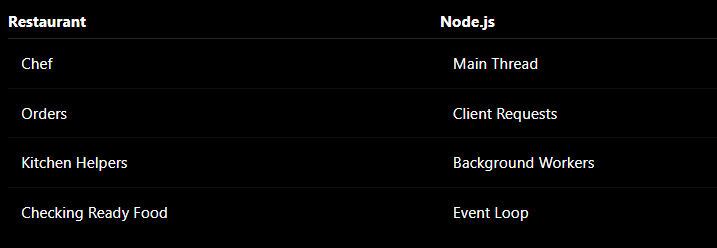
Chapter 5: Event Loop Kya Hai?
Simple Definition
Event Loop continuously check karta hai:
"Kya koi async task complete hua?"
Agar complete ho gaya:
- callback execute karo
Event Loop Example:
console.log("Start");

setTimeout(() => {
  console.log("Timer Finished");
}, 2000);

console.log("End");
Output
Start
End
Timer Finished
Why?
Step-by-step:
Step 1
Start print hua
Step 2
setTimeout background mein gaya
Step 3
Main thread next line par gaya
Step 4
End print hua
Step 5
2 sec baad callback execute hua
Chapter 6: Async Nature of Node.js
Node.js ka main power hai:
Non-Blocking I/O
Matlab:
wait mat karo
background mein bhejo
next task handle karo
Blocking Example
readFile(); // wait here
sendResponse();
Problem:
- pura thread wait karega
Non-Blocking Example
readFile(() => {
   sendResponse();
});
Yahan:
file read background mein gayi
main thread free ho gaya
Chapter 7: FreeAPI Practical Example
Ab real-world example use karte hain.
Hum data fetch karenge from:
https://freeapi.hashnode.space
Setup:
Step 1
mkdir node-concurrency
cd node-concurrency
Step 2
npm init -y
Step 3
npm install express axios
Chapter 8: First Express Server
server.js
const express = require("express");

const app = express();

app.get("/", (req, res) => {
    res.send("Server Running");
});

app.listen(3000, () => {
    console.log("Server Started");
});
Run Server
node server.js
Browser:
http://localhost:3000
Output:
Server Running
Chapter 9: FreeAPI Se Data Fetch Karna
Updated server.js
const express = require("express");
const axios = require("axios");

const app = express();

app.get("/users", async (req, res) => {

    console.log("Request Received");

    const response = await axios.get(
        "https://api.freeapi.app/api/v1/public/randomusers"
    );

    console.log("Data Fetched");

    res.json(response.data);
});

app.listen(3000, () => {
    console.log("Server Started");
});
Line-by-Line Explanation
Line 1
const express = require("express");
Samjho:
require()module import karta haiyahan hum Express framework import kar rahe hain
Express server banana easy karta hai
Line 2
const axios = require("axios");
Samjho:
Axios ek HTTP client library hai
Isse hum APIs hit karte hain
Yahan FreeAPI ko request bhejenge
Line 4
const app = express();
Samjho:
express()ek Express application create karta haiappke through routes banengeserver configure hoga
Line 6
app.get("/users", async (req, res) => {
Samjho:
Yahan:
Part | Meaning |
| GET route create karta hai |
| URL route |
| client request object |
| response bhejne ka object |
| async code likhne ke liye |
Matlab:
Jab koi user /users hit kare,
toh ye function run hoga.
Line 8
console.log("Request Received");
Samjho:
server console mein message print karega
ye debugging ke liye useful hota hai
hume pata chalega request aayi hai
Line 10-12
const response = await axios.get(
    "https://api.freeapi.app/api/v1/public/randomusers"
);
Most Important Part
axios.get()
Ye FreeAPI ko HTTP GET request bhej raha hai.
await
Matlab:
"Response ka wait karo"
BUT IMPORTANT:
Node.js:
pura application block nahi karta
sirf is function ko pause karta hai
tab tak dusri requests handle hoti rehti hain
Isi ko:
Non-Blocking Async Behavior
bolte hain.
response
API jo data return karegi:
- wo
responsevariable mein store hoga
Line 14
console.log("Data Fetched");
Samjho:
jab API response aa jayega
tab ye line execute hogi
Matlab:
API successfully complete ho gayi
Line 16
res.json(response.data);
Samjho:
client ko JSON response bhej raha hai
response.dataactual API data hota hai
Browser ko data return ho jayega.
Line 19-21
app.listen(3000, () => {
    console.log("Server Started");
});
Samjho:
app.listen()
Server start karta hai.
3000
Port number hai.
Matlab:
http://localhost:3000
par server chalega.
Callback Function:
() => {
   console.log("Server Started")
}
Ye tab chalega jab server successfully start ho jayega.
Internal Flow Visualization:
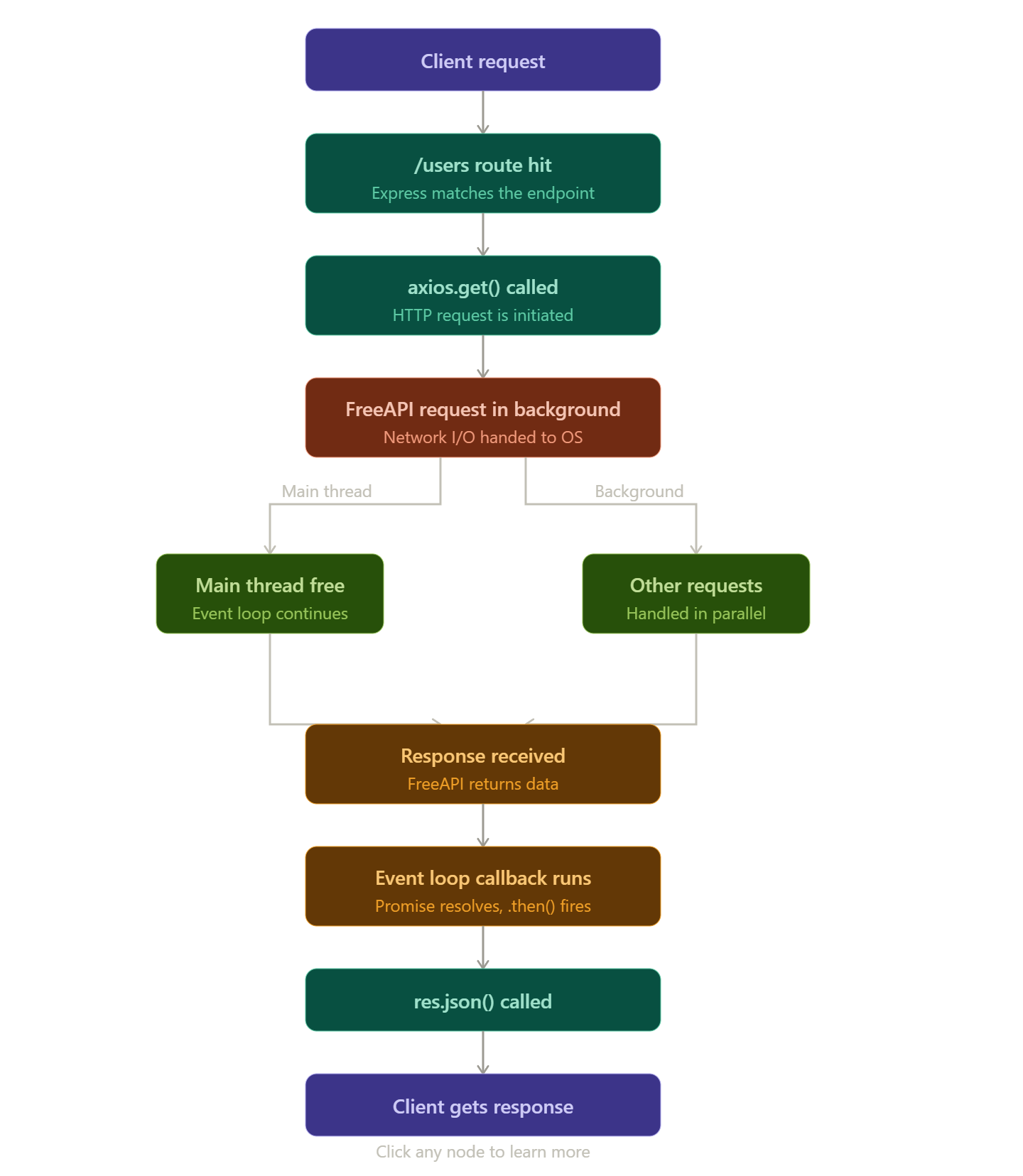
Important Understanding
Node.js ka magic:
"Wait mat karo.
Background mein bhejo.
Next request handle karo."
Isi wajah se:
APIs fast lagti hain
Node.js scalable hota hai
Multiple users efficiently handle hote hain
Chapter 9: FreeAPI Se Data Fetch Karna
Updated server.js
const express = require("express");
const axios = require("axios");

const app = express();

app.get("/users", async (req, res) => {

    console.log("Request Received");

    const response = await axios.get(
        "https://api.freeapi.app/api/v1/public/randomusers"
    );

    console.log("Data Fetched");

    res.json(response.data);
});

app.listen(3000, () => {
    console.log("Server Started");
});
Test
Open:
http://localhost:3000/users
JSON data milega
Chapter 10: Internally Kya Ho Raha Hai?
Step-by-Step Flow
Step1
Request aayi:
GET /users
Step2
Ye line execute hui:
await axios.get(...)
API response aane mein time lag sakta hai.
Question:
Kya Node.js pura server stop kar deta hai?
Nahi
Actual Mein Kya Hota Hai
Node.js:
network request background system ko de deta hai
khud wait nahi karta
Matlab:
"Response aane tak main dusre requests handle karta hoon"
Yahi concurrency hai.
Chapter 11: Multiple Users Example
Ab hum prove karenge ki:
User A request bhej raha hai
User B bhi request bhej raha hai
User C bhi request bhej raha hai
Aur Node.js sabko efficiently handle kar raha hai.
const express = require("express");

const app = express();

app.get("/user", async (req, res) => {

    const id = Math.floor(Math.random() * 1000);

    console.log(`Request ${id} Started`);

    await new Promise((resolve) => {
        setTimeout(resolve, 5000);
    });

    console.log(`Request ${id} Completed`);

    res.send(`User ${id} Data Fetched`);
});

app.listen(3000, () => {
    console.log("Server Running");
});
Experiment
Browser mein multiple tabs quickly open karo:
http://localhost:3000/user
Console Output
Request 101 Started
Request 203 Started
Request 501 Started
Request 876 Started

(after 5 sec)

Request 101 Completed
Request 203 Completed
Request 501 Completed
Request 876 Completed
Important Observation
Notice:
Saari requests ek saath start ho gayi
Agar Node.js blocking hota:
pehle request complete hoti
phir second start hoti
Lekin aisa nahi hua
Chapter 12: Event Loop Flow Diagram
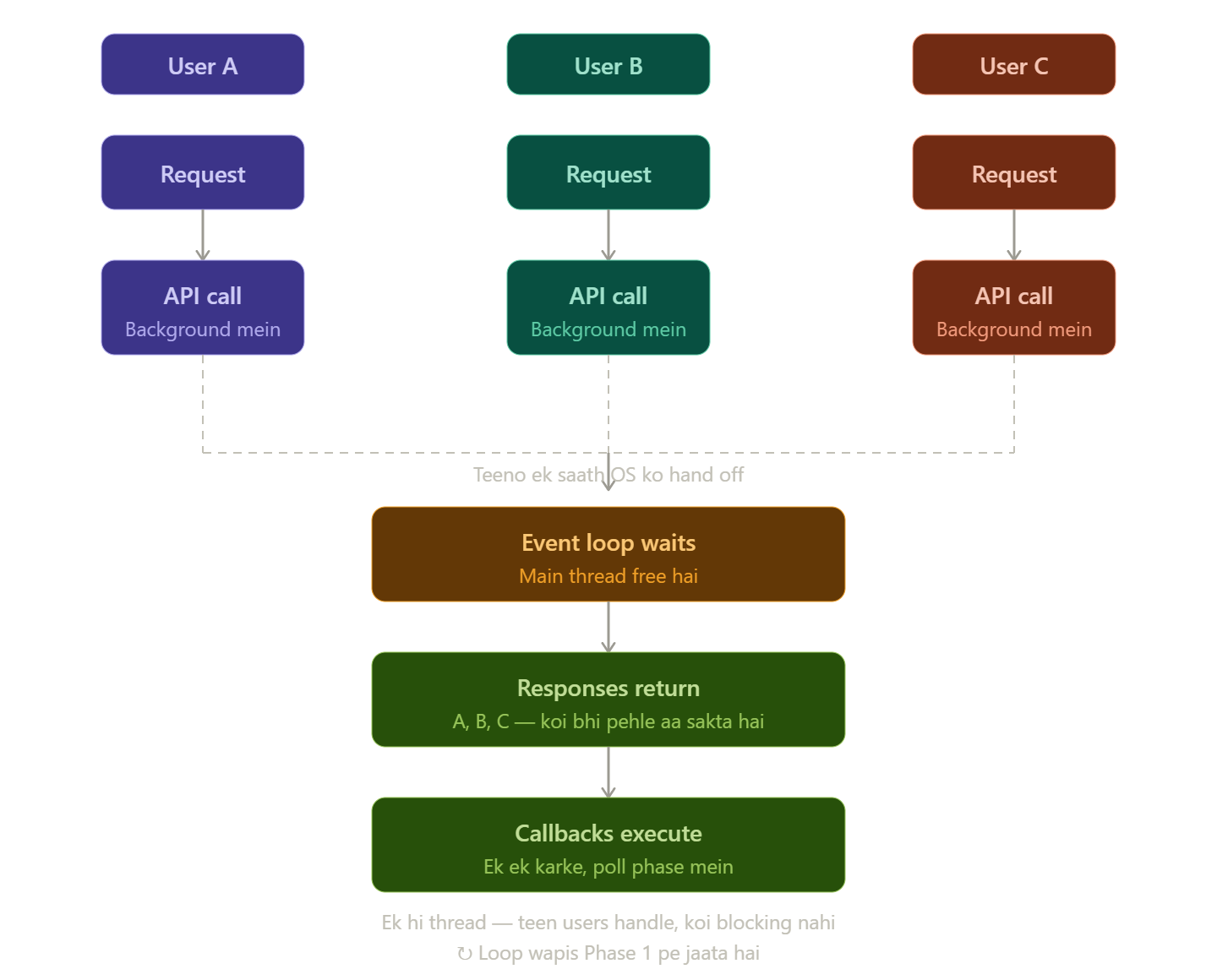
Chapter 13: Another Event Loop Example
console.log("A");

setTimeout(() => {
  console.log("B");
}, 0);

console.log("C");
Output
A
C
B
Explanation
Step 1
A print hua
Step 2
Timer background mein gaya
Step 3
C print hua
Step 4
Callback queue mein aaya
Step 5
Event loop ne B execute kiya
Chapter 14: Concurrency vs Parallelism
Concurrency:
Meaning:
Multiple tasks efficiently manage karna
Example:
ek chef multiple orders manage kar raha


