How DNS Resolution Works
What is DNS and why name resolution exists?
DNS stands for domain name system. DNS is used to convert browser url to IP address. Forward lookup resolves domain names to IP addresses, reverse lookup does the opposite, and name resolution commonly refers to the forward process.
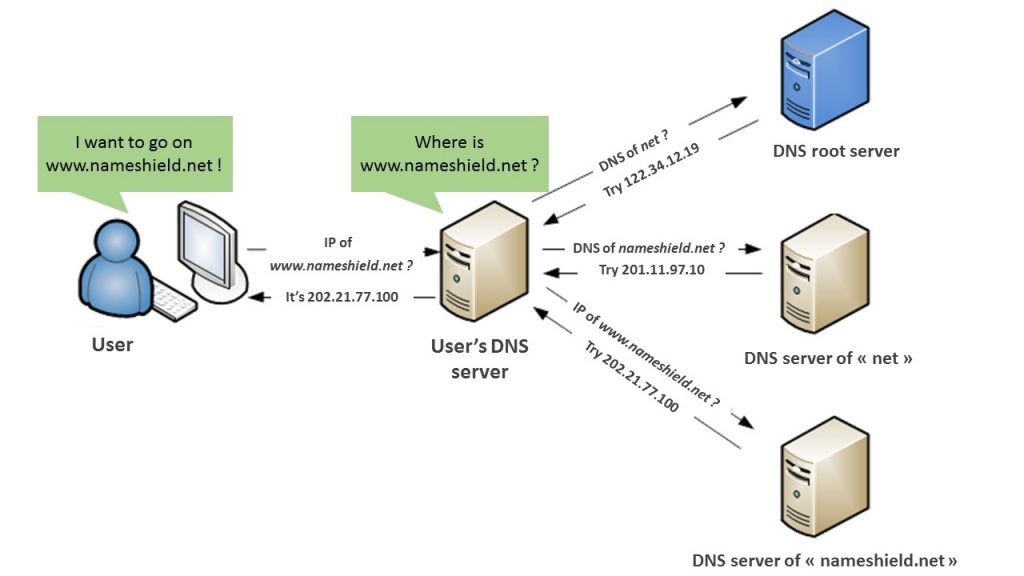
Why name resolution exists?
- Humans remember names, not numbers
1. People understandgoogle.com
2. Computers need IP addresses like142.250.195.46
2. IP addresses change frequently
1. Servers are replaced
2. Load balancing is added
3. Cloud scaling happens
4. Regions change
3. Names stay stable, IPs can change
1. Domain name remains the same
2. IP address can change behind the scenes
4. Avoids hard-coding IPs in applications
1. Without name resolution, apps depend directly on IPs
2. IP change = code change + redeploy
Removes tight coupling between app and server
1. App talks to a name, not a server
2. Infrastructure changes do not break applicationsEnables scalability
1. One name can map to multiple IPs
2. Load balancing and CDNs become possibleImproves reliability
1. If one server fails, traffic can go to another
2. Reduces downtimeProvides operational flexibility
1. Easy server migration
2. Disaster recovery
3. Infrastructure upgrades without impact
Name: Stable IP: Flexible
Why is Dig command?
Browser hides DNS and with dig commands reveals below information:
Who is responsible
Who you are talking to
How resolution actually works
Root of the internet→ dig .NS
Command
dig .NSWho runs the ROOT of the internet
Answer
a.root-servers.net`[b.root-servers.net](http://b.root-servers.net)...[m.root-servers.net`](http://m.root-servers.net)I don’t know Google.
But I know who handles.com,.in,.org.→ Root servers never give IP addresses. They only give directions.
.comLevel —dig com NSCommand
dig com NSWho manages all
.comwebsites?
Answer
a.gtld-servers.net
b.gtld-servers.net
...
TLD servers says:
1. I don’t know Google’s IP.
2. But I know who owns google.com.
Google’s Own Servers — dig google.com NS
Commanddig google.com NS
Who is the official authority for google.com?
Answerns1.google.com`[ns2.google.com](http://ns2.google.com) ...`
These servers are authoritative.
I am Google. I know everything about google.com.
Finally Getting the IP — dig google.com
dig google.com
What happens:
1. Ask Root
Who handles .com?
- Ask
.com
Who handles google.com?
- Ask Google’s DNS
What is the IP of google.com?
Google replies
142.250.195.46


